My Apple Collection
Blog about my Apple Collection

 Yesterday I was planning on picking up a PowerMac Quicksilver in Amsterdam, but it seemed I didn’t had time because I’d had to join my brother to watch his hockey game in Aerdenhout. Because of some health problems within my family I haven’t been on my office past week, but yesterday my colleague called there was a big package waiting on my desk. Cool, that’s probably my PowerBook 5300cs I bought from Marktplaats. So I went to the office this afternoon (sunday) to have a look.
It’s in great shape, no dead pixels or anything, only the battery is drained (What to expect from a 18 year old machine haha), it came with a original apple mouse (which is mostly brown instead of white as time has past by) and an s-video to ps2 adapter to hook the machine up to a TV. It’s quite a heavy machine but the dimensions make it a very pretty small portable for it’s time.
It runs Mac OS 8.6 and I have to say this really brings up memories, I haven’t seen Netscape Navigator (well no LAN port and no Airport card installed) and Eudora Pro icons in years and I forgot about the colored Apple pictogram on the top left. It has Adobe Illustrator 5.5 installed and the opening window reminds me on all the old Adobe software series I’ve used. All OS sounds when clicking and scrolling etc. make me happy, even when emptying the trashcan, it all reminds me a bit of my Apple Newton.
The display is again in great condition, I think it’s a CSTN type of screen instead of TFT because of the ghosting that appears, but it hasn’t got any vague areas on it.
Despite his low-end specs compared to a machine of this date, it runs very nice and quick:
Apple PowerPC 603e processor on 100 Mhz
40 MB memory
500 MB disk
 |
|
| Release date | August 25, 1995 |
|---|---|
| Introductory price | 2300 - 6800 |
| Discontinued | August 3, 1996 |
| Operating system | System 7.5.2 |
| CPU | PowerPC 603e @ 100 - 117 MHz |
| Memory | 8 MB, expandable to 64 MB (70 ns unique DRAM card) |
Although a significant advance over preceding portable Macs, the PowerBook 5300 suffered from a number of design decisions and manufacturing problems that have led to it being cited as among the worst Apple products of all time.[2] Amongst other issues, it was one of the first laptops to suffer negative publicity from battery fires,[3] and featured a hot-swappable drive bay with insufficient space for an internal CD-ROM drive.
Contents

Well, to start off, I’ve never owned such a machine but I did “work” on one during a week in 2001 when I was on a mini internship for school at my dad’s office. When deciding to collect macs, I definitely wanted all available colors from this model… starting with the fruit colors, they make you happy right

When spending time searching the online market places I found one for a cheap price in a village “only” 30 km away… Velsen-Noord.
So I e-mailed I wanted the machine and if I could pick it up. After some measuring at the office with an A4 paper around my scooter, no go, I went home to get a big sports bag and thought it would probably fit in there and went to Velsen-Noord. I thought it would only be a half hour drive, but I’ve ended up at the destination after 1.5 hours with many roadblocks and poor navigation on my phone.
The iMac was demonstrated to me and included the original colored power cable, a bondi blue keyboard and a gray puck mouse, nice! So we tried to fit the machine in my massive sports bag with bubble-wrap-paper… no go and I also got a bit scared on the weight of the machine. The previous owners helped me with some duck-tape to fit in the iMac and attached the bag to my back while I took seat on my scooter, we both laughed all the time because it was ridiculous. It felt like my adventure with the PowerMac G5 from Amsterdam, but worse. (I was also planning on picking-up an 17″ eMac at Alkmaar this evening, but I e-mailed the guy from my phone that I couldn’t make it)
On my way home I put the bag just behind me and pushed it against the top-case of my scooter so it wouldn’t fall off. Of course I took a different and “shorter” way home… which again took me 1.5 hours and I needed fuel. Luckily I came across a gas station and managed to get on and off my scooter without dropping the sports bag.
Near Purmerend I came across a friend (which is a “milkman”) with his truck, so I drove next to his truck and horned (I got some free pastry yesterday from him through a colleague at work, which I wanted to thank him for). While parking my scooter next to him at the side of the road, you can guess what happened, the bag felt off the scooter on the ground…oops. After a short talk I went further on my way home.
I was a bit scared to look in the bag at home, but when I unpacked the bag it seemed the iMac did survive! It powers on and everything seems to work. The keyboard acted faulty so I tested it with another keyboard and played around for a while.
Here are the specs:
Apple G3 333 Mhz processor
160 MB RAM
6 GB disk
Runs Mac OS X 10.3.9 (Panther)
I’ve got to say that (despite I hear the hard disk is doing his very best) it’s still runs smooth for such a low config.

The slot-loading iMac G3
|
|
| Developer | Apple Inc. |
|---|---|
| Type | Desktop |
| Release date | August 15, 1998 |
| Discontinued | March 18, 2003 |
| Operating system | Mac OS 8, Mac OS 9, Mac OS X |
| CPU | PowerPC 750, 233 MHz – 700 MHz (SE) |
The first consumer-facing Apple product to debut under the recently returned interim CEO Steve Jobs, the iMac G3, among other factors, was responsible for Apple's turnaround from financial ruin during the late nineties and revitalized the Apple brand as design-oriented and simple. It was, nevertheless, criticized for abandoning then-current technological standards like the ADB connector in favor of the emerging USB standard.
From introduction in May 1998, the iMac G3 was updated with new hardware specifications and colorations over the years until it was supplanted by its successor, the iMac G4, as well as the eMac. Ultimately discontinued in March 2003, the iMac G3 became a noted part of late 1990s pop culture.
Contents
History[edit]

The iMac was dramatically different from any previous mainstream computer. It was made of translucent "Bondi Blue"-colored plastic, and was egg-shaped around a 14-inch (35.5 cm) CRT. There was a handle, and the computer interfaces were hidden behind a door that opened on the right-hand side of the machine. Dual headphone jacks in the front complemented the built-in stereo speakers. Sir Jonathan Ive, currently Senior Vice President of Industrial Design at Apple, is credited with the industrial design.


A radical step was to abandon the 3½-inch floppy disk drive (which had been present in every Mac since the first one in 1984). Apple argued that recordable CDs, the Internet, and office networks were quickly making diskettes obsolete. Apple had initially announced the internal modem in the iMac would operate at only 33.6 kbit/s rather than the new 56 kbit/s speed, but was forced by consumer pressure to adopt the faster standard. Apple's omissions generated controversy.[4] At the time of iMac's introduction, third-party manufacturers offered external USB floppy disk drives, often in translucent plastic to match the iMac's enclosure.
The keyboard and mouse were redesigned for the iMac with translucent plastics and a Bondi Blue trim (Apple USB Keyboard and Apple USB Mouse). The keyboard was smaller than Apple's previous keyboards, with white letters on black keys, both features that attracted debate. The mouse was mechanical, of a round, "hockey puck" design which was derided as being unnecessarily difficult for users with larger hands.
Apple continued shipping the round mouse, adding a divot to the button in later versions so that users could distinguish proper orientation by feel. Eventually, a new capsule-shaped optical mouse, known as the Apple Mouse (formerly "Apple Pro Mouse"), replaced the round mouse across all of Apple's hardware offerings.
Technical[edit]

The original iMac had a 233 MHz PowerPC G3 (PowerPC 750) chip, with 512 KB L2 cache running at 116.6 MHz, which also ran in Apple's high-end Power Macintosh line at the time, though at higher speeds, with more expensive models shipping with 1 MB L2 cache. It sold for US$1,299, and had a 4 GB hard drive, 32 MB RAM, 2 MB video RAM, and shipped with Mac OS 8.1, which was soon upgraded to Mac OS 8.5.
Parts such as the front-mounted IrDA port and the tray-loading CD-ROM drive were borrowed from the Apple laptops. Although the iMac did not officially have an expansion slot, the first versions had a slot dubbed the "mezzanine slot".[5] It was only for internal use by Apple, although a few third-party expansion cards were released for it, such as a Voodoo II video card upgrade from 3dfx and SCSI/SCSI-TV tuner cards (iProRAID and iProRAID TV) from the German company Formac.
The mezzanine slot was removed from later iMacs, though according to an article in the German computer magazine c't, the socket can be retrofitted on revision C iMacs.[citation needed] The hard drive in the iMac G3 was a Quantum Fireball.
Updates[edit]

A later hardware update created a sleeker design. This second-generation iMac featured a slot-loading optical drive, FireWire, "fanless" operation (through free convection cooling), and the option of AirPort wireless networking. Apple continued to sell this line of iMacs until March 2003, mainly to customers who wanted the ability to run the older Mac OS 9 operating system.
USB and FireWire support, and support for dial-up, Ethernet, and wireless networking (via 802.11b and Bluetooth) soon became standard across Apple's entire product line. In particular, the high-speed interface, FireWire, corrected the deficiencies of the earlier iMacs.
The iMac CRT model, now targeted at the education market, was renamed the iMac G3, and kept in production alongside the iMac G4 successor until the eMac was released.
As Apple continued to release new versions of its computers, the term iMac continued to be used to refer to machines in its consumer desktop line.
Models[edit]
iMac (tray-loading)[edit]

The original iMac.
|
|
| Developer | Apple Inc. |
|---|---|
| Type | Desktop |
| Release date | August 15, 1998 |
| Operating system | Mac OS 8.1, up to Mac OS X 10.3.9 |
| CPU | PowerPC G3, 233 – 333 MHz |
The first iteration of the iMac G3 featured a 14-inch CRT display at 1024 x 768 resolution, a 233 MHz processor, ATI Rage IIc graphics with 2 MB of SGRAM, a 4 GB hard drive, a 24x CD-ROM optical drive, two USB 1.1 ports, a 56 kbit/s Modem, built-in 100BASE-TX Ethernet, a 4 Mbit/s infrared port, built-in stereo speakers, a microphone, audio line in and audio line out, and two headphone ports. It included an Apple USB Mouse and Apple USB Keyboard; the former being notorious for its hockey puck-like shape. It ran Mac OS 8.1 out of the box. It came exclusively in a translucent blue plastic whose color was marketed as Bondi Blue. This particular first model was known as Revision A.
Subsequently, on October 17, the iMac was updated to ATI Rage Pro graphics that offered 6 MB of SGRAM compared to the earlier 2 MB. This updated model became known as Revision B, and maintained its predecessor's original price of $1299.
The iMac had its infrared and mezzanine features removed with the introduction of the updated Revision C model on January 5, 1999, and as a result, had a price reduction to US$1199, despite an increase in hard drive capacity from 4 GB to 6 GB and a faster 266 MHz processor. The Bondi Blue color was discontinued and replaced by five new colors; these colors being Strawberry, Blueberry, Lime, Grape, and Tangerine.
Before the introduction of the slot-loading iMac, the tray-loading iMac had a final update with the Revision D model on April 14, 1999, which maintained Revision C's specifications save a faster 333 MHz processor.
| Model | iMac [1] | iMac (Revision B) [2] | iMac (266 MHz)[3] | iMac (333 MHz)[4] |
|---|---|---|---|---|
| Codename | "Columbus, Elroy, Tailgate, C1" | "Life Savers" | ||
| Colors | Bondi Blue | Blueberry, Grape, Strawberry, Tangerine, and Lime | ||
| Processor | 233 MHz PowerPC G3 (750) | 266 MHz PowerPC G3 (750) | 333 MHz PowerPC G3 (750) | |
| Cache | 64 KB of L1 Cache and 512 KB of L2 backside cache (1:2) | |||
| Front Side Bus | 66 MHz | |||
| Memory Two slots for PC100 SDRAM (SO-DIMM) |
32 MB Expandable to 384 MB (128 MB supported by Apple)[7] |
32 MB Expandable to 512 MB (256 MB supported by Apple)[8]Note: CPU and memory were located on the same 'Daughter Card', which installed directly onto the motherboard itself.[9] |
||
| Display | 13.8-inch shadow-mask CRT screen with 1024 x 768 pixel resolution (via internal DA-15 connector) | |||
| Graphics | ATI Rage IIc graphics processor with 2 MB of SGRAM memory Expandable to 6 MB of SGRAM memory |
ATI Rage Pro graphics processor with 6 MB of SGRAM memory | ||
| Hard drive ATA-3 5400 rpm |
4 GB Up to 128 GB Hard Drive Supported |
6 GB Up to 128 GB Hard Drive Supported |
||
| Optical drive | 24x tray-loading CD-ROM drive | |||
| Modem | Integrated 56 kbit/s | |||
| Minimum operating system required | Mac OS 8.1 or 8.5[10] | Mac OS 8.5.1[11] | ||
| Maximum Operating System | Mac OS X 10.3.9 “Panther” and Mac OS 9.2.2 Unofficially, can run Mac OS X 10.4 “Tiger” and Mac OS X 10.5 "Leopard" with XPostFacto and a G4 Upgrade |
|||
| Weight | 38.1 lb / 17.2 kg | |||
| Dimensions | 15.8 x 15.2 x 17.6 inch / 40.1 x 38.6 x 44.7 cm | |||
iMac (slot-loading)[edit]
The iMac (slot loading).
|
|
| Developer | Apple Inc. |
|---|---|
| Type | Desktop |
| Release date | October 5, 1999 |
| Operating system | Mac OS 8.6, up to Mac OS X 10.4.11 |
| CPU | PowerPC G3, 350–700MHz |
On July 19, 2000, Apple reduced the price of the entry-level iMac to US$799. Hardware changes were minimal; the AirPort card slot was removed (for the base configuration), the USB Mouse was replaced with an Apple Pro Mouse, the ATI Rage 128 VR graphics was replaced with an ATI Rage 128 Pro subsystem, and it was available in a darker shade of blue called Indigo rather than Blueberry. The iMac DV was reduced to US$999, at the expense of its DVD-ROM optical drive for a CD-ROM one, and was available in Indigo and a new color of Ruby. At the former price point of the iMac DV, the iMac DV+ was introduced, which boasted a 450 MHz processor and a 20 GB hard drive, in the colors of Indigo, Ruby, and the exclusive Sage. The iMac DV Special Edition remained at the same price but gained a 500 MHz processor, 30 GB hard drive, and was available in the colors of Graphite and the exclusive Snow.
On February 22, 2001, Apple consolidated its configurations to three. The iMac DV was renamed iMac and made the base-entry configuration; it became available only in Indigo at US$899. A second entry-level configuration was introduced with a 500 MHz processor, new ATI Rage 128 Ultra graphics, 64 MB of RAM, and a 20 GB hard drive in Indigo as well, along with two patterns named Flower Power and Blue Dalmatian that were molded into the plastic exterior. The iMac DV Special Edition was renamed iMac Special Edition and was also available in Indigo and the two new patterns, although with a 600 MHz processor, 128 MB of RAM, and a 40 GB hard drive at the same US$1499 price.
- July 18, 2001 — (summer 2001). 500, 600, or 700 MHz (PPC750CXe) processor. Available in indigo, graphite, and snow. 700 MHz model discontinued in January 2002 after G4 iMacs were introduced. 500 and 600 MHz models discontinued March 2003.
| Model | iMac (Slot Loading) [5] | iMac (Summer 2000) [6] | iMac (Early 2001) [7] | iMac (Summer 2001) [8] |
|---|---|---|---|---|
| Codename | "Kihei, P7" | N/A | N/A | "Kiva" |
| Colors | Blueberry, Grape, Strawberry, Tangerine, Lime, and Graphite | Indigo, Ruby, Sage, Snow, and Graphite | Indigo, Graphite, Blue Dalmatian, and Flower Power | Indigo, Graphite, and Snow |
| Processor | 350 MHz or 400 MHz PowerPC G3 (750) | 350 MHz, 400 MHz, 450 MHz or 500 MHz PowerPC G3 (750) | 400 MHz PowerPC G3 (750), 500 MHz or 600 MHz PowerPC G3 (750CX) | 500 MHz PowerPC G3 (750CX), 600 or 700 MHz PowerPC G3 (750CXe) |
| Cache | 64 KB of L1 Cache and 512 KB of L2 Backside Cache (2:5) | 64 KB of L1 Cache. 512 KB of L2 Backside Cache (2:5) or 256 KB of L2 Cache (1:1) | 64 KB of L1 Cache and 256 KB of L2 Cache (1:1) | |
| Front Side Bus | 100 MHz | |||
| Memory Two slots for PC100 SDRAM |
64 MB or 128 MB Expandable to 1 GB (512 MB supported by Apple)[12] |
64 MB or 128 MB Expandable to 1 GB |
64 MB, 128 MB or 256 MB Expandable to 1 GB |
|
| Display | 13.8-inch shadow-mask CRT screen with 1024 x 768 pixel resolution (plus VGA port for video mirroring) | |||
| Graphics | ATI Rage 128 VR graphics processor (AGP 2X) with 8 MB of memory | ATI Rage 128 Pro graphics processor (AGP 2X) with 8 MB of memory | ATI Rage 128 Pro graphics processor (AGP 2X) with 8 MB of memory or ATI Rage 128 Ultra (AGP 2X) with 16 MB of memory | ATI Rage 128 Ultra graphics processor (AGP 2X) with 16 MB of memory |
| Hard drive Ultra-ATA 5400 rpm |
6 GB, 10 GB or 13 GB Up to 128 GB Hard Drive Supported |
7 GB, 10 GB, 20 GB or 30 GB Up to 128 GB Hard Drive Supported |
10 GB, 20 GB or 30 GB Up to 128 GB Hard Drive Supported |
20 GB, 40 GB or 60 GB Up to 128 GB Hard Drive Supported |
| Optical drive | 24x slot-loading CD-ROM drive or 4x slot-loading DVD-ROM drive | 24x slot-loading CD-ROM drive or 8x CD-R and 4x CD-RW recording and 32x CD Read slot-loading CD-RW drive 4x slot-load DVD-ROM drive supported |
||
| AirPort | Optional AirPort 802.11b card (adapter required) | |||
| Modem | Integrated 56 kbp/s | |||
| Minimum operating system required | Mac OS 8.6[13] | Mac OS 9.0.4 | Mac OS 9.1 | Mac OS 9.1 and Mac OS X 10.0.4 |
| Maximum Operating System | Mac OS X 10.3.9 “Panther” and Mac OS 9.2.2 on 350 MHz. Mac OS X 10.4 "Tiger" and Mac OS 9.2.2 on 400 MHz. Unofficially, 350 MHz can run Mac OS X 10.4 “Tiger” |
Mac OS X 10.3.9 “Panther” and Mac OS 9.2.2 on 350 MHz model. Mac OS X 10.4 "Tiger" and Mac OS 9.2.2 on 400 MHz, 450 MHz, 500 MHz. Unofficially, 350 MHz can run Mac OS X 10.4 “Tiger” |
Mac OS X 10.4 “Tiger” and Mac OS 9.2.2 | |
| Weight | 34.7 lb / 15.7 kg | |||
| Dimensions | 15.0 x 15.0 x 17.1 inch / 38.1 x 38.1 x 43.5 cm | |||
Timeline of iMac models
See also: Timeline of Macintosh models and Timeline of Apple Inc. products

External links[edit]
 |
Wikimedia Commons has media related to IMac G3. |
| Preceded by Power Macintosh G3 (All-in-One) |
iMac G3 August 15, 1998 |
Succeeded by iMac G4 eMac |
|
|||||||||||||||||||||||
|
|||||||||||||||||||||||||||||||||||||||||||||||
I’ve always liked the metal dotted casings from the PowerMacs and first generation Mac Pro’s, while owning my G5 iMac, G4 PowerBook and an Intel MacBook 13″ white, doesn’t seemed the investment worth.
While looking for a white apple keyboard and mice for my acquired iMac G4 15″, I came across an ad on Marktplaats for a Dual G5 PowerMac… including a keyboard and mouse for a reasonable price. I immediately e-mailed the guy if it was ok to pick up the machine and I later drove through Amsterdam like an idiot packed with the heavy mac and accessories on my scooter lol.
The machine and accessory is in mint condition, really got a nice deal The specs are the following:
2 x Apple G5 Processor 2 Ghz
1,25 GB RAM
160 GB sata drive
Superdrive
No OS installed, drive is wiped.
I’m going to upgrade the drives to 2 x 1TB which I’ve laying around and use it at home as a download/fileserver and TimeMachine backup machine.
The Power Mac G5 is Apple Inc.'s marketing name for models of the Power Macintosh that contained the IBM PowerPC G5 CPU. The professional-grade computer was the most powerful in Apple's lineup when it was introduced, widely hailed as the first 64-bit PC, and was touted by Apple as the fastest personal computer ever built. It was officially launched as part of Steve Jobs' keynote presentation in June 2003 at the Worldwide Developers Conference, and saw three revisions to the line before being retired in August 2006 to make way for its Intel replacement, the Mac Pro. The Power Mac G5 has an anodized aluminium chassis.[1]

 The inside of a Power Mac G5 Dual Processor 1.8 GHz
The PowerPC G5 (called the PowerPC 970 by its manufacturer, IBM) is based upon IBM's dual-core POWER4 microprocessor. At the introduction of the Power Mac G5, Apple announced a partnership with IBM in which IBM would continue to produce PowerPC variants of their POWER processors. According to IBM's Dr. John E. Kelly, "The goal of this partnership is for Apple and IBM to come together so that Apple customers get the best of both worlds, the tremendous creativity from Apple Computers and the tremendous technology from the IBM corporation. IBM invested over $3 billion US dollars in a new lab to produce these large, 300 mm wafers." (This lab is a completely automated facility located in East Fishkill, New York, and figures heavily in IBM's microelectronics strategy above and beyond the partnership with Apple). The original PowerPC 970 has 50 million transistors and is manufactured using IBM CMOS 9S at 130 nm fabrication process. CMOS 9S is the combination of SOI, Low-k dielectric insulation, and Copper interconnect technology, which were invented at IBM research in the mid-1990s. Subsequent revisions of the "G5" processor have included IBM's PowerPC 970FX (same basic design on a 90 nm process), and the PowerPC 970MP (essentially two 970FX cores on one die). Apple refers to the dual-core PowerPC 970MP processors as either the "G5 Dual" (for single-socket, dual-core configurations), or Power Mac G5 Quad (for dual-socket, four-core configurations).
The inside of a Power Mac G5 Dual Processor 1.8 GHz
The PowerPC G5 (called the PowerPC 970 by its manufacturer, IBM) is based upon IBM's dual-core POWER4 microprocessor. At the introduction of the Power Mac G5, Apple announced a partnership with IBM in which IBM would continue to produce PowerPC variants of their POWER processors. According to IBM's Dr. John E. Kelly, "The goal of this partnership is for Apple and IBM to come together so that Apple customers get the best of both worlds, the tremendous creativity from Apple Computers and the tremendous technology from the IBM corporation. IBM invested over $3 billion US dollars in a new lab to produce these large, 300 mm wafers." (This lab is a completely automated facility located in East Fishkill, New York, and figures heavily in IBM's microelectronics strategy above and beyond the partnership with Apple). The original PowerPC 970 has 50 million transistors and is manufactured using IBM CMOS 9S at 130 nm fabrication process. CMOS 9S is the combination of SOI, Low-k dielectric insulation, and Copper interconnect technology, which were invented at IBM research in the mid-1990s. Subsequent revisions of the "G5" processor have included IBM's PowerPC 970FX (same basic design on a 90 nm process), and the PowerPC 970MP (essentially two 970FX cores on one die). Apple refers to the dual-core PowerPC 970MP processors as either the "G5 Dual" (for single-socket, dual-core configurations), or Power Mac G5 Quad (for dual-socket, four-core configurations).
 The PowerPC 970FX inside a PowerMac G5.
The Power Mac G5 line in 2006 consisted of three, dual-core PowerPC G5 configurations, operating at 2.0, 2.3, and a dual-processor 2.5 GHz configuration (the dual contains four cores in total, two per processor). A 2.7 GHz single-core model was also released. It contains PCI-X slots, where the newer models use PCI Express. The dual-core G5 configuration can communicate through its FSB at half its internal clock speed. Each processor in the Power Mac G5 has two unidirectional 32-bit pathways: one leading to the processor and the other from the processor. These result in a total bandwidth of up to 20 GB/s. The processor at the heart of the Power Mac G5 has a "superscalar, superpipelined" execution core that can handle up to 216 in-flight instructions, and uses a 128-bit, 162-instruction SIMD unit (AltiVec).
The PowerPC 970FX inside a PowerMac G5.
The Power Mac G5 line in 2006 consisted of three, dual-core PowerPC G5 configurations, operating at 2.0, 2.3, and a dual-processor 2.5 GHz configuration (the dual contains four cores in total, two per processor). A 2.7 GHz single-core model was also released. It contains PCI-X slots, where the newer models use PCI Express. The dual-core G5 configuration can communicate through its FSB at half its internal clock speed. Each processor in the Power Mac G5 has two unidirectional 32-bit pathways: one leading to the processor and the other from the processor. These result in a total bandwidth of up to 20 GB/s. The processor at the heart of the Power Mac G5 has a "superscalar, superpipelined" execution core that can handle up to 216 in-flight instructions, and uses a 128-bit, 162-instruction SIMD unit (AltiVec).
In addition, due to the 64-bit processor (and 42-bit MMU) the Power Mac G5 has a RAM capacity greater than the 4 GB addressable memory limit of traditional 32-bit processors. Currently, the Power Mac G5 can hold 16 GB of RAM using eight memory slots with 2 GB per stick. All modern 32-bit x86 processors since the Pentium Pro have the Physical Address Extension (PAE) feature, which permits them to use a 36-bit physical memory address to address a maximum of 236 bytes (64 gigabytes) of physical memory, while the PowerPC 970 processor is capable of addressing 242 bytes (4 terabytes) of physical memory and 264 bytes (16 exabytes) of virtual memory. The memory in this final revision of the Power Mac G5 is Dual-Channel DDR2 PC4200, with support for ECC memory.
While looking for a white apple keyboard and mice for my acquired iMac G4 15″, I came across an ad on Marktplaats for a Dual G5 PowerMac… including a keyboard and mouse for a reasonable price. I immediately e-mailed the guy if it was ok to pick up the machine and I later drove through Amsterdam like an idiot packed with the heavy mac and accessories on my scooter lol.
The machine and accessory is in mint condition, really got a nice deal
The specs are the following:2 x Apple G5 Processor 2 Ghz
1,25 GB RAM
160 GB sata drive
Superdrive
No OS installed, drive is wiped.
I’m going to upgrade the drives to 2 x 1TB which I’ve laying around and use it at home as a download/fileserver and TimeMachine backup machine.

Apple Power Mac G5
|
|
| Developer | Apple Computer, Inc. |
|---|---|
| Type | Desktop |
| Release date | June 24, 2003 |
| Introductory price | USD$1,999 (as of 2006[update]) |
| Discontinued | August 7, 2006 |
| CPU | 1.6 – 2.7 GHz Single, Dual Processor, Dual core or Two dual core processors PowerPC G5 |
Contents
PowerPC G5 and the IBM partnership[edit]


In addition, due to the 64-bit processor (and 42-bit MMU) the Power Mac G5 has a RAM capacity greater than the 4 GB addressable memory limit of traditional 32-bit processors. Currently, the Power Mac G5 can hold 16 GB of RAM using eight memory slots with 2 GB per stick. All modern 32-bit x86 processors since the Pentium Pro have the Physical Address Extension (PAE) feature, which permits them to use a 36-bit physical memory address to address a maximum of 236 bytes (64 gigabytes) of physical memory, while the PowerPC 970 processor is capable of addressing 242 bytes (4 terabytes) of physical memory and 264 bytes (16 exabytes) of virtual memory. The memory in this final revision of the Power Mac G5 is Dual-Channel DDR2 PC4200, with support for ECC memory.
External links[edit]
|
Wikimedia Commons has media related to Power Mac G5. |
- Ars Technica: Inside the PowerPC 970, very long and detailed
- Ars Technica: A Brief Look at the PowerPC 970
- Ars Technica Review: Power Mac G5 Dual 2.5 GHz
- Forevermac.com: The Power Mac G5 Quad Core 2.5gHz
| Preceded by Power Mac G4 |
Power Mac G5 June 24, 2003 |
Succeeded by Mac Pro |
|
|||||||||||||||||||||||
|
|||||||||||||||||||||||||||||||||||||||||||||||
This is the coolest designed iMac ever I’ve bought it on the dutch trade site Marktplaats in a city nearby (Landsmeer).

When I got over there it seemed she kept the iMac in their barn and it wouldn’t boot anymore when she wanted to demonstrate the machine to me.
I wasn’t interested anymore but then she offered it to me for free, else she would’ve put it next to the trash at the curb (to my blog readers: you can always call me to pick it up then lol).
So I took the machine to my office and took it apart, when I took it apart it seemed the machine was completely filled up with dust and hairs, probably from the pet.
I cleaned it with the vacuum cleaner and replaced the motherboard battery, also the cd-rom drive was broken so I replaced this with a spare DVD drive.
The power cable also seemed not trustable, also replaced this and now the iMac spins flawlessly again
Specs:
Apple G4 733 Mhz processor
256 MB ram
30 GB hard drive
DVD player (upgraded)
It currently runs 10.3.9 Panther and I’ll upgrade it to Tiger (10.4.x) when I’ve got time for that.
The b>iMac G4
I’ve bought it on the dutch trade site Marktplaats in a city nearby (Landsmeer).When I got over there it seemed she kept the iMac in their barn and it wouldn’t boot anymore when she wanted to demonstrate the machine to me.
I wasn’t interested anymore but then she offered it to me for free, else she would’ve put it next to the trash at the curb (to my blog readers: you can always call me to pick it up then lol).
So I took the machine to my office and took it apart, when I took it apart it seemed the machine was completely filled up with dust and hairs, probably from the pet.
I cleaned it with the vacuum cleaner and replaced the motherboard battery, also the cd-rom drive was broken so I replaced this with a spare DVD drive.
The power cable also seemed not trustable, also replaced this and now the iMac spins flawlessly again
Specs:
Apple G4 733 Mhz processor
256 MB ram
30 GB hard drive
DVD player (upgraded)
It currently runs 10.3.9 Panther and I’ll upgrade it to Tiger (10.4.x) when I’ve got time for that.

The iMac G4 15 inch
|
|
| Developer | Apple Inc. |
|---|---|
| Type | Desktop |
| Release date | January 7, 2002 |
| Discontinued | August 31, 2004 |
| CPU | 700 MHz – 1.25 GHz PowerPC G4 |
The iMac G4 was sold with the "Apple Pro Keyboard" and "Apple Pro Mouse", which would be later redesigned and renamed the Apple Keyboard and Apple Mouse, respectively. Also, there was an option to buy the "Apple Speakers", which were better quality than the internal speakers, which were low quality due to their size. Apple Pro Speakers had a unique, small adapter and only worked on a select few Apple Macs (such as this one).
Apple advertised it as having the flexibility of a desk lamp and it was nicknamed the "iLamp", similar to "Luxo Jr.", who was featured in a short film produced by Pixar, another venture of Apple co-founder Steve Jobs. It was featured in an ad, sitting in a store window and "reacting" to every move made by a passer-by on the street. At the end, when the man sticks out his tongue, the iMac responds by opening its optical drive.[1] It was also known as the "Sunflower".
The iMac G4 was incrementally upgraded. They were made available with 17-inch (43 cm) and then 20-inch (51 cm) widescreen LCDs over the following two years. By then, Apple had all but eliminated the CRT machines from its product line. However, the LCD iMacs were unable to match the low price point of the previous iMac G3s, largely because of the higher cost of the LCD technology at the time.
The iMac G3 was obsolete by this point, but low-cost machines were particularly important for the education market. It was still being sold for a while after the iMac G4 debuted, until the G3 found a permanent replacement in April 2002 with the eMac.
Contents
Technical specifications[edit]


New features included a flat-panel LCD screen, with diagonal measurements up to 20 inches (released November 18, 2003),[2] and a tray loading DVD+CD drive. The floating monitor was adjustable, and stood at any angle around the dome-shaped bottom. Unlike previous iMac models, the iMac G4 came only in white, and was not translucent like the iMac G3s.
The Gateway Profile was one of the few Wintel competitors to the iMac G4 in the all-in-one LCD computer market. A reviewer noted that the Profile had better processing power, due to its Intel Pentium 4, whereas the iMac was hampered because its G4 chip lacked the 1 MB L2 cache found on the Power Mac. The iMac had clear advantages in LCD screen quality (it uses a digital LCD as opposed to an analog LCD), ergonomics (particularly the flexible monitor arm), and multimedia. The reviewer concluded that the iMac was good for introducing users to a Macintosh, but he noted that their (relatively) high prices were approaching that of laptops, which are actually portable and have higher resolution LCD screens. The Profile would also be undercut by numerous OEM Wintel offerings (including one from Gateway) that bundled an LCD screen with a mini-tower case containing a Pentium 4.[3]
When running newer versions of Mac OS X (Tiger and Leopard), the iMac G4's GeForce4 MX GPU is not capable of Core Image rendering. This causes some minor graphical issues. One such issue would be the lack of the Dashboard ripple effect when a widget is introduced. Another would be an opaque menu bar in Mac OS X Leopard.
- January 7, 2002 — Apple introduces a new iMac line with three models.[4] It has a new futuristic form factor and contains a 700 or an 800 MHz G4 processor, and is only available in white. The display is now a 15-inch LCD, easily positioned by the "swing arm" attaching it to the base. (15-inch, 800 MHz model is M8535LL/A)
- July 17, 2002 — A new 800 MHz model with a 17-inch screen and an updated GPU is added to the line. (M8812LL/A)
- February 4, 2003 — The line is slimmed down to two models, one with a 15-inch LCD and a new 1.0 GHz model with a 17-inch LCD (M8935LL/A). AirPort Extreme as well as Bluetooth are available on the 17-inch model. The 15-inch model is largely identical to the January 2002 models.
- September 8, 2003 — The iMac 15-inch and 17-inch models are upgraded to a 1.0 GHz and 1.25 GHz G4 processors, respectively (M9285LL/A, M9168LL/A). New features are USB 2.0 and DDR memory, and they both now support AirPort Extreme and Bluetooth.[5]
- November 18, 2003 — 20-inch screen model (M9290LL/A) is added that is capable of a 1680 x 1050 pixel screen resolution, and features a 1.25 GHz G4 processor.
| Component | iMac G4 | iMac G4 (Mac OS X Only) | iMac G4 (1 GHz, DDR) | iMac G4 (USB 2.0) |
|---|---|---|---|---|
| Release Date | January 7, 2002 (15"), July 17, 2002 (17") | February 4, 2003 | September 8, 2003 (15 & 17"), November 18, 2003 (20") | |
| Model Identifier | PowerMac4,2 (15") PowerMac4,5 (17") |
PowerMac6,1 | ||
| Display | ||||
| 15" TFT LCD, 1024 × 768 | N/A | 15" TFT LCD, 1024 × 768 | ||
| 17" TFT Widescreen LCD, 1440 × 900 | N/A | 17" TFT Widescreen LCD, 1440 × 900 | ||
| N/A | 20" TFT Widescreen LCD, 1680 x 1050 | |||
| Processor | 700 MHz or 800 MHz PowerPC G4 (7450) | 800 MHz PowerPC G4 (7450) | 1.0 GHz PowerPC G4 (7445) | 1.0 GHz (15"), 1.25 GHz (17 & 20") PowerPC G4 (7445) |
| Cache | 64 KB L1, 256 KB L2 (1:1) | |||
| Front Side Bus | 100 MHz | 133 MHz | 167 MHz | |
| Memory | 128 MB, 256 MB of PC133 SDRAM Expandable up to 1 GB via one factory installed memory module in a 168-pin DIMM slot and one 144-pin user-accessible SO-DIMM slot. |
256 MB of PC133 SDRAM Expandable up to 1 GB via one factory installed memory module in a 168-pin DIMM slot and one 144-pin user-accessible SO-DIMM slot. |
256 MB of PC2100 (266 MHz) DDR SDRAM Expandable up to 2 GB via one factory installed memory module in a 184-pin DIMM slot and one 200-pin user-accessible SO-DIMM slot (officially only 1 GB is supported) |
256 MB of PC2700 (333 MHz) DDR SDRAM Expandable up to 2 GB via one factory installed memory module in a 184-pin DIMM slot and one 200-pin user-accessible SO-DIMM slot. (officially only 1 GB is supported) |
| Graphics | nVidia GeForce 2 MX with 32 MB of DDR SDRAM (15"). nVidia GeForce 4 MX with 32 MB of DDR SDRAM (17") | nVidia GeForce 2 MX with 32 MB of DDR SDRAM | nVidia GeForce 4 MX with 64 MB of DDR SDRAM | nVidia GeForce 4 MX with 32 MB of DDR SDRAM (15"). nVidia GeForce FX 5200 Ultra with 64 MB of DDR SDRAM (17 & 20") |
| Hard drive | 40 GB, 60 GB, 80 GB | 60 GB | 80 GB Supports Hard Drives larger than 128 GB |
80 GB Supports Hard Drives larger than 128 GB |
| Optical drive | 8x DVD and 32x CD read Combo drive or 32x CD-R and 10x CD-RW write CD-RW Drive (700 MHz) | 32x Combo drive | N/A | 32x Combo drive (15") |
| 6x DVD and 24x CD read; 2x DVD-R, 8x CD-R, and 4x CD-RW write SuperDrive (800 MHz) | N/A | 4x SuperDrive | 4x SuperDrive (17" and 20") | |
| Connectivity | Optional 11 Mbit/s AirPort 802.11b 10/100Base-T Ethernet 56k V.90 modem |
Optional 11 Mbit/s AirPort 802.11b 10/100Base-T Ethernet 56k V.92 modem |
Optional 54 Mbit/s AirPort Extreme 802.11b/g 10/100Base-T Ethernet 56k V.92 modem Optional Bluetooth 1.1 |
|
| Peripherals | 3x USB 1.1 2x Firewire 400 Built-in microphone Audio out Apple Pro Speakers mini-jack |
3x USB 2.0 2x Firewire 400 Built-in microphone Audio out Apple Pro Speakers mini-jack |
||
| Video out | Mini-VGA | |||
| Maximum Operating System | Mac OS X 10.4 “Tiger” and Mac OS 9.2.2 Unofficially, can run Mac OS X 10.5 “Leopard” |
Mac OS X 10.4 “Tiger”. Unofficially, can run Mac OS X 10.5 “Leopard” |
Mac OS X 10.5 “Leopard” | |
| Weight | 15": 21.3 lb. / 9.7 kg, 17": 22.8 lb. / 10.4 kg | 21.3 lbs. / 9.7 kg | 22.8 lbs. / 10.4 kg | 15": 21.3 lb. / 9.7 kg, 17": 22.8 lb. / 10.4 kg, 20": 40.1 lb. / 18.2 kg |
Timeline of iMac models
See also: Timeline of Macintosh models and Timeline of Apple Inc. products
Modern Uses[edit]
The iMac G4 is now obsolete, but continues to be desired due to its radical design. When the iMac G4 was replaced by the iMac G5 on August 31, 2004, the succeeding iMac G5 received a mixed reaction: though it was a more powerful computer, reviewers commented that it was less ergonomic since it did not retain the flexible adjustable arm of its G4 predecessor.iMac G4s are still used in a computing sense. Many are used as legacy machines which still have a large user base due to their PowerPC architecture, allowing them to run native PowerPC applications at speed without the need for emulation, making them in some instances faster than many more modern machines. Also, there is a large modification community, who either wish to upgrade their iMacs to a more usable machine by today's standards or find other uses for them. For example, one alternative use is to repurpose them into second monitors for another computer by using a VNC client and other appropriate software.[6] Due to the largely proprietary hardware and specifications, finding replacement parts (such as LCD panels) or upgrading the hardware can be a difficult and tedious task, with mixed results and often a relatively large outlay in monetary value compared to the improvement in performance or usefulness.
Although Apple (and consequently most software vendors) no longer support the G4 architecture, many Linux distributions, including Debian and Gentoo, continue to provide free, open source, modern operating systems that work well on this machine.[7] The advantage to this is that updated browsers can be installed, allowing the machine to continue to be useful (although Flash support is limited.)

External links[edit]
|
Wikimedia Commons has media related to iMac_G4. |
- Apple Product Page
- Video of iMac G4 introduction at Macworld San Francisco
- iMac G4 TV ad
- Profile: 15" iMac G4/700, 800
- Video of Jobs launching the iMac G4 at Macworld 2002
| Preceded by iMac G3 |
iMac G4 January 7, 2002 |
Succeeded by iMac G5 |
|
|||||||||||||||||||||||
|
|||||||||||||||||||||||||||||||||||||||||||||||
This is the first white model of a Mac Mini, I’ve acquired this machine a year a go in a city nearby (Hoorn).
I did want to use it as a home theatre device for my TV, but it seems it isn’t strong enough to handle that.
It is still a cool little mac and is in great condition, specs:
Apple G4 1.42 Ghz processor
1 GB ram
50 GB hard drive
Superdrive
Airport
Bluetooth
The Mac Mini (marketed as Mac mini) is a small form factor desktop computer manufactured by Apple Inc. Like earlier mini-ITX PC designs, it is 7.7 inches (196 mm) square and 1.4 inches (36 mm) tall. It weighs 2.7 pounds (1 kg). Before the mid-2011 revision, all models, except the late 2009 and 2010 server models, came with an internal optical disc drive. Models pre-2010 used an external power supply and were narrower but taller at 2.0 × 6.5 × 6.5 inches (51 × 170 × 170 mm). The Mac Mini is one of three desktop computers in the current Macintosh lineup, the other two being the iMac and Mac Pro, although it generally uses components usually featured in laptops, hence its small size.
The Mac Mini was the first consumer level Macintosh desktop to ship without a display, keyboard, or mouse since Apple's success following the release of the iMac, with Apple marketing it as BYODKM (Bring Your Own Display, Keyboard, and Mouse). The primary intended market for the Mac Mini was users switching from a traditional Windows PC to a Mac who might already own a compatible display, keyboard and mouse, though these could be easily purchased if needed.[6] A special Server version of the computer is also intended for use as a server in a small network, and starting with the mid-2010 revision, all Server models include the Server edition of the OS X operating system.
The updated unibody Mac Mini is notable as Apple's first computer to include an HDMI video port to connect to a television or other display, more readily positioning the unit as a home theater device alternative to the Apple TV.[7]
The Mac Mini is an entry-level computer intended for budget-minded customers. Until the 2011 release, the Mac Mini had much less processing power than the other computers of the Macintosh lineup. Unlike regular desktop computers, which use standard-sized components such as 3.5-inch hard drives, Apple uses lower power laptop components in the Mac Mini to fit all the necessary components into the small case and to prevent overheating, common in such compact spaces.[10] Previously, with the choice of components on the older models, the machine was considered somewhat slower than standard desktop computers. It also had less storage and memory than comparable desktops. However, the 2011 upgrade addressed many of these previous complaints.
In general, the Mac Mini has been praised as a relatively affordable computer with a solid range of features. However, the press also agrees that it is relatively high priced for a computer aimed at the lower segment of the market. It is possible to buy small form factor computers at the same price with faster processors, better graphics card, more memory, and/or more storage.[11] Nevertheless, the small form factor has made the Mac Mini particularly popular as a home theater solution.
On October 22, 2009, Apple introduced a new server version of the Mac Mini along with revisions of the computer. This model lacks an optical drive, but contains a second hard drive in its place. This version is marketed as an affordable server for small businesses and schools.
A new model of the Mini was introduced on June 15, 2010. The new model was thinner, with a unibody aluminum case designed to be easily opened for RAM access, and incorporated upgraded hardware, such as an HDMI port and Nvidia GeForce 320M graphics. An update announced July 20, 2011 dropped the internal CD/DVD optical drive from all versions and introduced a Thunderbolt port, Intel Core i5 processor, and either Intel HD Graphics 3000 integrated graphics or AMD Radeon HD 6630M dedicated graphics. The server model was upgraded to a quad-core Intel Core i7 processor. Quad-core i7 CPUs are also used in the late-2012 desktop Mac Mini computers.[12]
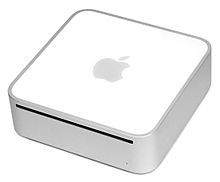
The original Mac Mini before the 2010 re-design

Inside of an Intel Mac Mini circa 2007
The most notable feature of the Mac Mini is its size. The original design measured only 2.0 × 6.5 × 6.5 inches (51 × 170 × 170 mm). The exterior of the original Mac Mini was made of aluminum capped with polycarbonate plastic on the top and bottom. The original design had no visible screws and was not meant to be upgraded by the user. The back of the machine contains the I/O ports and vents for the cooling system. It had an external power supply.
The Mac Mini, updated on June 15, 2010, was fully redesigned,[1] being slimmer than the prior models at only 1.4 inches (36 mm) tall, but wider at 7.7 inches (196 mm) a side. The weight rose from 2.9 to 3.0 pounds (1.3 to 1.4 kg). The power supply is now internal as opposed to external. The chassis no longer has the polycarbonate plastic on the top or bottom. The newer model, introduced July 20, 2011 has the same physical dimensions but is slightly lighter, at 2.7 pounds (1.2 kg), presumably because it lacks an internal CD/DVD drive.
The current Mac Mini is designed to be opened using a round cover on the bottom of the computer. Prior versions of the Mini were much more difficult to open. Some Mac Mini owners used a putty knife or a pizza cutter to pry open the cases of older Mini models to gain access to the interior for installation of cheaper third party memory upgrades.[13] The official Apple Service Source manual for Mac Mini describes this procedure in detail, including an official Apple part number for a "modified putty knife". It's also possible to use wires to pull the white plastic bottom case out of the metal top case.[14] While opening the case does not actually void the Mac Mini warranty, anything broken while the case is open is not covered.[15] Other modifications include hard disk upgrades, overclocking the processor (G4 only),[16] and upgrading the wireless networking (for older models) to 802.11n.[17] The 2009 model can have its SuperDrive replaced with a second SATA hard drive.[18] The removal of the optical drive in the 2011 models leaves internal space for a second internal hard drive or SSD, which can be ordered as a BTO option from Apple, or as an upgrade kit from 3rd party suppliers.
With the switch to the Intel Core Solo and Duo line, Apple initially used a socketed CPU in the Mac Mini that allowed the processor to be replaced. They switched to a non-socketed CPU with the 2009 model that did not allow an easy upgrade. With the June 2010 revision, the case can be readily opened to add RAM.

A 2008 Mac Mini as a home theater PC demonstrating the Front Row application. Current models include an HDMI port for easy connection with modern televisions and home theater receivers.
It can be classified as a home theater PC (HTPC) with some limits. The Mac Mini does not include an integrated TV tuner card and cannot be upgraded to install one internally; accessing TV requires external devices like Elgato's EyeTV USB adapter or SiliconDust's HDHomeRun networked TV tuner which will encode and manage broadcast television from a cable or satellite receiver. The July 2011 model lacks a built in CD/DVD player and OS X Lion no longer supports FrontRow remote control software.
Pre-2009 Mac Mini models had a video connector which was compatible with DVI, HDMI (video only), SVGA, S-Video and composite video with the appropriate adapter. Sound is provided by a combination jack that uses both mini-RCA (analog) and optical fiber cables (digital).[20] Unlike the Apple TV, the Mac Mini is backward compatible with televisions that have only composite or S-Video inputs. As of the July 2011 revision of the Mac Mini, the computer sports an Intel HD3000 graphics processor with an optional Radeon graphics processing unit available and Thunderbolt which makes decoding high-resolution video much quicker and efficient. The addition of an HDMI port simplifies connecting the Mini to high-definition televisions and home theater AV receivers.
Because of the similar small form factor, HDMI port, remote control IR receiver, and media browser interface, some users see the Mac Mini as an Apple TV alternative.[7] It has both iTunes for media rental, purchase, and management, and a native user interface with Front Row, based on the user interface of the original Apple TV.[20][21] The Apple TV is limited to video in the MP4 format, whereas Mac Mini users employing the appropriate QuickTime codecs can watch other video formats like Divx, Xvid, and the Matroska (Mkv) container, or almost all other formats using an open source player such as VLC, without resorting to hacks. The current Intel models of Mac Mini can display video via the HDMI port at a maximum resolution of 1080p[19] and up to 2560x1600 via the mini display port with a compatible monitor.
The Mac Mini can also run third-party front-end media player applications for Mac OS X, such as Plex or XBMC, to be used as a home theater PC (HTPC).
The 2006 and 2007 Mac Minis that come standard with a 32-bit Intel Core Duo processor can be changed to an Intel 64-bit Core 2 Duo processor through a simple upgrade.[30] Since the 2006 and 2007 "Merom"-based Mac Minis came with socketed processors, the 32-bit processor can easily be removed, and replaced with a compatible 64-bit Intel Core 2 Duo processor. The following processors are compatible: 2.00 GHz Intel T7200 SL9SF, 2.16 GHz Intel T7400 SL9SE, 2.33 GHz Intel T7600 SL9SD. The more recent 2009 and later Mac Minis have the processors soldered onto the logic board and thus are not upgradable. Once the 2006 Mac Mini has been upgraded to a 64-bit Core 2 Duo processor, and RAM is upgraded to at least 2 GB, it can run OS X Lion through a minor modification by editing or deleting the platformsupport.plist file.[31][32] A 2007 Mac Mini will run OS X Lion without any modification. Many users have found that such upgrades can make the 2006/2007 Mac Minis' performance even better than the 2009 Mac Mini models. Geekbench scores have shown that the 2.33 GHz Core 2 Duo fitted Mac Mini with 2 GB of RAM has a score of 3060 whereas a late 2009 Mac Mini with 2 GB of RAM has 3056 making the two machines fairly comparable.[33][34]
While the Mac Mini G4 contained a separate graphics processor, all revisions of the Intel-based Mac Mini contain integrated GPUs, except in the 2011 version where the 2.5 GHz model contains a separate AMD Radeon GPU. In Apple's early marketing of the Mac Mini G4, it touted the superiority of the use of a discrete ATI Radeon 9200 32 MB graphics card over the integrated graphics included in many budget PCs.[35] The Intel GMA that was built into the Mac Mini was criticized for producing stuttering video, despite supporting hardware accelerated H.264 video playback, and disappointing frame rates in graphics-intensive 3D games.[36]

Back panel of a mid-2007 2,1 model Mac Mini. From left to right, first row: power button, 10 ventilation holes, Kensington lock slot, audio in, audio out. Second row: DC in, gigabit Ethernet, Firewire 400, DVI, 4 USB 2.0 ports
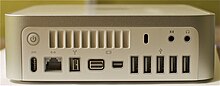
Back panel of a late 2009 3,1 model Mac Mini. From left to right, first row: power button, 10 ventilation holes, Kensington lock slot, audio in, audio out. Second row: DC in, gigabit Ethernet, Firewire 800, mini DVI, mini-DisplayPort, 5 USB 2.0 ports
The I/O ports were changed with the early 2009 revision. A fifth USB 2.0 port was added and the FireWire 400 port was replaced with a FireWire 800 port. The AirPort card was upgraded to 802.11a/b/g/draft-n and later to 802.11a/b/g/n. Bluetooth was also upgraded from 2.0 to 2.1. Instead of a single full-size DVI port, a mini-DVI port was added along with a Mini DisplayPort connection, which allows dual display support. Unlike the DVI port, the Mini DisplayPort supports external displays with a resolution up to 2560 × 1600, which allows use of the 30-inch Cinema Display with the Mac Mini. As of this revision, the Apple Remote is no longer included with the Mac Mini.
The Mac Mini 2009 model gave access to 3 different USB busses on the back. Port 2 shares a USB bus with the IR connection. Ports 1+5 and 3+4 are each on their own USB bus. So it should be possible to get a throughput of 3x480=1440 Mbit/s.

Back panel of a mid-2010 4,1 model unibody Mac Mini. From left to right, first row: power button, AC power supply plug, Gigabit Ethernet, Firewire 800, HDMI, mini-DisplayPort, 4 USB 2.0 ports, SDXC card slot. Second row: ventilation holes, audio in, audio out
The built-in power supply negates the need for an external power supply "brick" used on prior models.[48]
There have been other changes in the 2011 revision. They include the elimination of the Kensington Security Slot,[49] as well as the optical drive. While the fifth USB 2.0 port was also removed, this has given space for an SD card slot to be included on the back of the machine.
Like the 2009 version, a Mini DisplayPort (which allows for a VGA connection, via a non-included cable) is included. An HDMI port, which Apple describes as being HDMI 1.4 compliant, replaces the mini-DVI port on the prior models as one of the main video connection methods. The HDMI port supports up to 1080p on HDMI connections and 8 channel 24-bit audio at 192 kHz, Dolby Surround 5.1 and stereo output. With the included HDMI to DVI adapter, for those currently using a DVI interface, the HDMI port will work with resolutions up to 1920 × 1200 pixels, while the Mini DisplayPort can concurrently support up to a resolution up to 2560 × 1600 pixels[citation needed].
I did want to use it as a home theatre device for my TV, but it seems it isn’t strong enough to handle that.
It is still a cool little mac and is in great condition, specs:
Apple G4 1.42 Ghz processor
1 GB ram
50 GB hard drive
Superdrive
Airport
Bluetooth
 |
This table may require cleanup to meet Wikipedia's quality standards. The specific problem is: Column widths. (October 2012) |

Current Unibody Mac Mini
|
|
| Manufacturer | Apple Inc. |
|---|---|
| Type | Desktop[1] & Server[2] |
| Release date | October 23, 2012 (current release) January 22, 2005 (original release) |
| Introductory price | US $599–799 |
| Media | CD/DVD drive (pre-July 2011 models), Digital distribution (post-July 2011 models) |
| Operating system | OS X[3][4] |
| Power | 84 W PSU (7 A@12 V) |
| CPU | Intel Core i5[3] & Core i7[4] (current release) PowerPC G4 (original release) |
| Memory | 4, 8, 16 GB DDR3 1600 MHz[5] |
| Storage | 500 GB (i5 model), 1 TB (i7 model), or two 1TB hard drives (i7 server model)[5] |
| Display | None included |
| Connectivity | Wi-Fi, Ethernet, Bluetooth, FireWire, USB 3 (current release), HDMI, SDXC, Thunderbolt[5] |
| Dimensions | 1.4 inches (36 mm) H 7.7 inches (196 mm) W 7.7 inches (196 mm) D |
| Weight | 2.7 pounds (1.2 kg)[Notes 1] |
| Related articles | iMac, Mac Pro |
| Website | Apple – Mac mini Apple – Mac mini Server |
The Mac Mini was the first consumer level Macintosh desktop to ship without a display, keyboard, or mouse since Apple's success following the release of the iMac, with Apple marketing it as BYODKM (Bring Your Own Display, Keyboard, and Mouse). The primary intended market for the Mac Mini was users switching from a traditional Windows PC to a Mac who might already own a compatible display, keyboard and mouse, though these could be easily purchased if needed.[6] A special Server version of the computer is also intended for use as a server in a small network, and starting with the mid-2010 revision, all Server models include the Server edition of the OS X operating system.
The updated unibody Mac Mini is notable as Apple's first computer to include an HDMI video port to connect to a television or other display, more readily positioning the unit as a home theater device alternative to the Apple TV.[7]
Contents
Overview[edit]
A small form factor computer had been widely speculated and requested long before the release of the Mac Mini. Rumors predicted that the "headless iMac" would be extremely small, include no display, and would be positioned as Apple's entry-level desktop computer.[8] On January 10, 2005, the Mac Mini was announced alongside the iPod shuffle at the Macworld Conference & Expo and was described by Apple CEO Steve Jobs at the time as "the cheapest, most affordable Mac ever".[6][9]The Mac Mini is an entry-level computer intended for budget-minded customers. Until the 2011 release, the Mac Mini had much less processing power than the other computers of the Macintosh lineup. Unlike regular desktop computers, which use standard-sized components such as 3.5-inch hard drives, Apple uses lower power laptop components in the Mac Mini to fit all the necessary components into the small case and to prevent overheating, common in such compact spaces.[10] Previously, with the choice of components on the older models, the machine was considered somewhat slower than standard desktop computers. It also had less storage and memory than comparable desktops. However, the 2011 upgrade addressed many of these previous complaints.
In general, the Mac Mini has been praised as a relatively affordable computer with a solid range of features. However, the press also agrees that it is relatively high priced for a computer aimed at the lower segment of the market. It is possible to buy small form factor computers at the same price with faster processors, better graphics card, more memory, and/or more storage.[11] Nevertheless, the small form factor has made the Mac Mini particularly popular as a home theater solution.
On October 22, 2009, Apple introduced a new server version of the Mac Mini along with revisions of the computer. This model lacks an optical drive, but contains a second hard drive in its place. This version is marketed as an affordable server for small businesses and schools.
A new model of the Mini was introduced on June 15, 2010. The new model was thinner, with a unibody aluminum case designed to be easily opened for RAM access, and incorporated upgraded hardware, such as an HDMI port and Nvidia GeForce 320M graphics. An update announced July 20, 2011 dropped the internal CD/DVD optical drive from all versions and introduced a Thunderbolt port, Intel Core i5 processor, and either Intel HD Graphics 3000 integrated graphics or AMD Radeon HD 6630M dedicated graphics. The server model was upgraded to a quad-core Intel Core i7 processor. Quad-core i7 CPUs are also used in the late-2012 desktop Mac Mini computers.[12]
Design[edit]


The Mac Mini, updated on June 15, 2010, was fully redesigned,[1] being slimmer than the prior models at only 1.4 inches (36 mm) tall, but wider at 7.7 inches (196 mm) a side. The weight rose from 2.9 to 3.0 pounds (1.3 to 1.4 kg). The power supply is now internal as opposed to external. The chassis no longer has the polycarbonate plastic on the top or bottom. The newer model, introduced July 20, 2011 has the same physical dimensions but is slightly lighter, at 2.7 pounds (1.2 kg), presumably because it lacks an internal CD/DVD drive.
The current Mac Mini is designed to be opened using a round cover on the bottom of the computer. Prior versions of the Mini were much more difficult to open. Some Mac Mini owners used a putty knife or a pizza cutter to pry open the cases of older Mini models to gain access to the interior for installation of cheaper third party memory upgrades.[13] The official Apple Service Source manual for Mac Mini describes this procedure in detail, including an official Apple part number for a "modified putty knife". It's also possible to use wires to pull the white plastic bottom case out of the metal top case.[14] While opening the case does not actually void the Mac Mini warranty, anything broken while the case is open is not covered.[15] Other modifications include hard disk upgrades, overclocking the processor (G4 only),[16] and upgrading the wireless networking (for older models) to 802.11n.[17] The 2009 model can have its SuperDrive replaced with a second SATA hard drive.[18] The removal of the optical drive in the 2011 models leaves internal space for a second internal hard drive or SSD, which can be ordered as a BTO option from Apple, or as an upgrade kit from 3rd party suppliers.
With the switch to the Intel Core Solo and Duo line, Apple initially used a socketed CPU in the Mac Mini that allowed the processor to be replaced. They switched to a non-socketed CPU with the 2009 model that did not allow an easy upgrade. With the June 2010 revision, the case can be readily opened to add RAM.
Home theater[edit]
The Mac Mini can be used for home cinema (theater) applications. The small footprint, multi-format video output, digital audio output, remote control IR receiver and the relatively powerful Intel CPUs make it easy to use the Mac Mini as part of a home entertainment system.[19]
Pre-2009 Mac Mini models had a video connector which was compatible with DVI, HDMI (video only), SVGA, S-Video and composite video with the appropriate adapter. Sound is provided by a combination jack that uses both mini-RCA (analog) and optical fiber cables (digital).[20] Unlike the Apple TV, the Mac Mini is backward compatible with televisions that have only composite or S-Video inputs. As of the July 2011 revision of the Mac Mini, the computer sports an Intel HD3000 graphics processor with an optional Radeon graphics processing unit available and Thunderbolt which makes decoding high-resolution video much quicker and efficient. The addition of an HDMI port simplifies connecting the Mini to high-definition televisions and home theater AV receivers.
Because of the similar small form factor, HDMI port, remote control IR receiver, and media browser interface, some users see the Mac Mini as an Apple TV alternative.[7] It has both iTunes for media rental, purchase, and management, and a native user interface with Front Row, based on the user interface of the original Apple TV.[20][21] The Apple TV is limited to video in the MP4 format, whereas Mac Mini users employing the appropriate QuickTime codecs can watch other video formats like Divx, Xvid, and the Matroska (Mkv) container, or almost all other formats using an open source player such as VLC, without resorting to hacks. The current Intel models of Mac Mini can display video via the HDMI port at a maximum resolution of 1080p[19] and up to 2560x1600 via the mini display port with a compatible monitor.
The Mac Mini can also run third-party front-end media player applications for Mac OS X, such as Plex or XBMC, to be used as a home theater PC (HTPC).
Intel-based Mac Mini[edit]
- The specifications below are from Apple's "tech specs" page,[3] except where noted.
Processors[edit]
The current non-server Mac Mini is available in two versions, one with a mobile dual-core 64-bit Intel Core i5 processor that runs at 2.5 GHz and one with a choice of a mobile quad-core Intel Core i7 2.3 GHz or a quad-core Core i7 2.6 GHz; the server model has a choice of the same processors as the faster non-server model. The CPU in the slower non-server model has a 3 MB on-chip L3 cache, and the CPUs available for the faster non-server model and the server model have a 6 MB on-chip L3 cache; the cache is shared between the cores and GPU (if in use). Prior revisions used a "Penryn" Intel Core 2 Duo processor, "Merom"-based Core 2 Duo and "Yonah"-based Core Duo and Solo chips.The 2006 and 2007 Mac Minis that come standard with a 32-bit Intel Core Duo processor can be changed to an Intel 64-bit Core 2 Duo processor through a simple upgrade.[30] Since the 2006 and 2007 "Merom"-based Mac Minis came with socketed processors, the 32-bit processor can easily be removed, and replaced with a compatible 64-bit Intel Core 2 Duo processor. The following processors are compatible: 2.00 GHz Intel T7200 SL9SF, 2.16 GHz Intel T7400 SL9SE, 2.33 GHz Intel T7600 SL9SD. The more recent 2009 and later Mac Minis have the processors soldered onto the logic board and thus are not upgradable. Once the 2006 Mac Mini has been upgraded to a 64-bit Core 2 Duo processor, and RAM is upgraded to at least 2 GB, it can run OS X Lion through a minor modification by editing or deleting the platformsupport.plist file.[31][32] A 2007 Mac Mini will run OS X Lion without any modification. Many users have found that such upgrades can make the 2006/2007 Mac Minis' performance even better than the 2009 Mac Mini models. Geekbench scores have shown that the 2.33 GHz Core 2 Duo fitted Mac Mini with 2 GB of RAM has a score of 3060 whereas a late 2009 Mac Mini with 2 GB of RAM has 3056 making the two machines fairly comparable.[33][34]
While the Mac Mini G4 contained a separate graphics processor, all revisions of the Intel-based Mac Mini contain integrated GPUs, except in the 2011 version where the 2.5 GHz model contains a separate AMD Radeon GPU. In Apple's early marketing of the Mac Mini G4, it touted the superiority of the use of a discrete ATI Radeon 9200 32 MB graphics card over the integrated graphics included in many budget PCs.[35] The Intel GMA that was built into the Mac Mini was criticized for producing stuttering video, despite supporting hardware accelerated H.264 video playback, and disappointing frame rates in graphics-intensive 3D games.[36]


Memory[edit]
Unlike the Mac Mini G4, the Intel-based Mac Mini uses a dual-channel architecture for memory. The original Intel-based Mac Mini uses 667 MHz DDR2 SDRAM, while models starting with the early 2009 revision use 1066 MHz DDR3 SDRAM. From the 2011 revision the Mac Mini supports up to 16 GB of memory. The current model also features a removable bottom panel, so that the memory can be replaced by the user. Since the integrated graphics processor does not have its own dedicated memory, the system shares some of the main system memory with it.Storage[edit]
The Intel-based Mac Mini moves away from the formerly used Ultra ATA/100 to the newer Serial ATA interface, which offers a maximum 3 Gbit/s transfer rate, however all models of Intel Mac Mini have been limited to 1.5 Gbit/s even though the SATA standard supports a transfer of 3 Gbit/s. All models continue to use 2.5-inch hard drives as opposed to the 3.5-inch drives used in standard desktops. A server edition of the Mac Mini was introduced in October 2009, which omits the optical drive in favor of a second hard drive for a total of 1 TB of storage. A Combo drive was initially offered as standard, with the SuperDrive being an option, but through the 2010 models, all models that have an optical drive contain the SuperDrive as standard. The 2010 standard version of the Mac (without Server) comes with a 300 GB or on 2.66 GHz 500 GB of storage.External connectivity[edit]
The original Intel-based Mac Mini includes four USB 2.0 ports and one FireWire 400 port. Networking is supported with a built-in Gigabit Ethernet port and an integrated 802.11b/g AirPort card. Bluetooth was also made standard. External displays are supported through a DVI port. While the Mac Mini G4 supports only analog audio output, the Intel-based Mac Mini has separate mini-TOSLINK/ 3.5 mm mini-jacks that support both analog audio input and output as well optical digital S/PDIF input and output.The I/O ports were changed with the early 2009 revision. A fifth USB 2.0 port was added and the FireWire 400 port was replaced with a FireWire 800 port. The AirPort card was upgraded to 802.11a/b/g/draft-n and later to 802.11a/b/g/n. Bluetooth was also upgraded from 2.0 to 2.1. Instead of a single full-size DVI port, a mini-DVI port was added along with a Mini DisplayPort connection, which allows dual display support. Unlike the DVI port, the Mini DisplayPort supports external displays with a resolution up to 2560 × 1600, which allows use of the 30-inch Cinema Display with the Mac Mini. As of this revision, the Apple Remote is no longer included with the Mac Mini.
The Mac Mini 2009 model gave access to 3 different USB busses on the back. Port 2 shares a USB bus with the IR connection. Ports 1+5 and 3+4 are each on their own USB bus. So it should be possible to get a throughput of 3x480=1440 Mbit/s.
Specifications[edit]
| Component | Intel Core | Intel Core 2 Duo | ||||
|---|---|---|---|---|---|---|
| Model | Early 2006[37] | Late 2006[38] | Mid 2007[39] | Early 2009[40] | Late 2009[41][42] | |
| Release date | February 28, 2006 | September 6, 2006 | August 7, 2007 | March 3, 2009 | October 20, 2009 | |
| Order number | MA205*/A, MA206*/A | MA607*/A, MA608*/A | MB138*/A, MB139*/A | MB463*/A, MB464*/A | MC238*/A, MC239*/A, MC408*/A | |
| Model identifier | Macmini1,1 | Macmini2,1 | Macmini3,1 | |||
| Model number | A1176 | A1283 | ||||
| Processor | 1.5 GHz Intel Core Solo (T1200) or 1.66 GHz Intel Core Duo (T2300)
Upgradable up to an Intel Core 2 Duo 2.33 GHz T7600 processor.[30] |
1.66 GHz (T2300) or 1.83 GHz (T2400) Intel Core Duo
Upgradable up to an Intel Core 2 Duo 2.33 GHz T7600 processor. [30] |
1.83 GHz (T5600) or 2.0 GHz (T7200) Intel Core 2 Duo
Upgradable up to an Intel Core 2 Duo 2.33 GHz T7600 processor. [30] |
2.0 GHz (P7350) Intel Core 2 Duo Optional 2.26 GHz (P8400) Intel Core 2 Duo |
2.26 GHz (P7550) or 2.53 GHz (P8700) Intel Core 2 Duo Optional 2.66 GHz (P8800) Intel Core 2 Duo |
|
| Cache | 2 MB on-chip L2 cache | 2 MB (1.83 GHz), 4 MB (2.0 GHz) shared | 3 MB on-chip L2 cache | |||
| Front-side bus | 667 MHz | 1067 MHz | ||||
| Memory | 512 MB (2 × 256 MB) of 667 MHz DDR2 SDRAM Expandable to 2 GB |
1 GB (2 × 512 MB) of 667 MHz DDR2 SDRAM Expandable to 4 GB |
1 GB (1 × 1 GB) or 2 GB (2 × 1 GB) of 1066 MHz DDR3 SDRAM Expandable to 8 GB (4 GB supported by Apple)[43][44] |
2 GB (2 × 1 GB) or 4 GB (2 × 2 GB) of 1066 MHz DDR3 SDRAM Expandable to 8 GB (4 GB supported by Apple) |
||
| Graphics | Intel GMA 950 using 64 MB of DDR2 SDRAM (up to 224 MB in OS X with sufficient RAM or Windows through Boot Camp)[45] | Nvidia GeForce 9400M using 128 MB or 256 MB of DDR3 SDRAM | Nvidia GeForce 9400M using 256 MB of DDR3 SDRAM | |||
| Shared with main memory | ||||||
| Hard drive | 60 or 80 GB Optional 100 GB or 120 GB |
60 or 80 GB Optional 100 GB, 120 GB, 160 GB |
80 or 120 GB Optional 160 GB |
120 or 320 GB Optional 250 GB |
160 or 320 GB 2 × 500 GB on server model Optional 500 GB |
|
| Serial ATA 5400-rpm | ||||||
| Optical drive | 8× DVD read, 24× CD-R and 16× CD-RW recording Combo drive or 8× DVD±R read, 4× DVD±R writes or 2× DVD±RW writes, 24× CD read, 16× CD-R, and 8× CD-RW recording SuperDrive |
8× DVD±R read, 6× DVD±R-DL writes, 8× DVD±R writes or 6× DVD±RW writes, 24× CD read, 24× CD-R and CD-RW recording SuperDrive |
8× DVD±R read, 6× DVD±R-DL writes, 8× DVD±R writes, 6× DVD-RW writes, 8× DVD+RW writes, 24× CD read, 24× CD-R and CD-RW recording SuperDrive No optical drive on server model |
|||
| Connectivity | Airport Extreme Atheros 802.11b/g Gigabit Ethernet Bluetooth 2.0+EDR |
Airport Extreme Broadcom 802.11a/b/g/draft-n Gigabit Ethernet Bluetooth 2.1+EDR |
Airport Extreme Broadcom 802.11a/b/g/n Gigabit Ethernet Bluetooth 2.1+EDR |
|||
| Peripherals | 4x USB 2.0 1x Firewire 400 Built-in mono speaker Audio-out mini-jack Audio line-in/digital audio input |
5x USB 2.0 1x Firewire 800 Built-in mono speaker Audio-out mini-jack Audio line-in/digital audio input |
||||
| Video out | DVI | Mini-DVI and Mini DisplayPort | ||||
| Original operating system | Mac OS X 10.4.5 "Tiger" | Mac OS X 10.4.7 "Tiger" | Mac OS X 10.4.10 "Tiger" | Mac OS X 10.5.6 "Leopard" | Mac OS X 10.6.1 "Snow Leopard" or Mac OS X 10.6.1 "Snow Leopard Server" | |
| Maximum operating system | Mac OS X 10.6.8 "Snow Leopard" Mac OS X 10.7.5 "Lion" using a workaround after Core 2 Duo upgrade.[31] |
Mac OS X 10.7.5 "Lion"[32] | OS X 10.9 "Mavericks"[46] | |||
| Weight | 2.9 pounds (1.3 kg) | |||||
| Dimensions | 2.0 inches (5.1 cm) H × 6.5 inches (17 cm) W × 6.5 inches (17 cm) D | |||||
Unibody Mac Mini[edit]

Structure[edit]
Starting from the mid-2010 revision, there is a removable panel on the bottom, enabling the user to upgrade the RAM. The new Mac Mini has an all-aluminium enclosure, called unibody. The unibody manufacturing process was originally developed for the MacBook Air[47] and later also used in the MacBook and MacBook Pro before being introduced into the Mac Mini range.The built-in power supply negates the need for an external power supply "brick" used on prior models.[48]
There have been other changes in the 2011 revision. They include the elimination of the Kensington Security Slot,[49] as well as the optical drive. While the fifth USB 2.0 port was also removed, this has given space for an SD card slot to be included on the back of the machine.
Like the 2009 version, a Mini DisplayPort (which allows for a VGA connection, via a non-included cable) is included. An HDMI port, which Apple describes as being HDMI 1.4 compliant, replaces the mini-DVI port on the prior models as one of the main video connection methods. The HDMI port supports up to 1080p on HDMI connections and 8 channel 24-bit audio at 192 kHz, Dolby Surround 5.1 and stereo output. With the included HDMI to DVI adapter, for those currently using a DVI interface, the HDMI port will work with resolutions up to 1920 × 1200 pixels, while the Mini DisplayPort can concurrently support up to a resolution up to 2560 × 1600 pixels[citation needed].
Specifications[edit]
| Component | Intel Core 2 Duo | Intel Core i5 & i7 | ||||||||||||||||||||||||||||||||||||||||||||||||||||||||||||||||||||||||||||||||||||||||||||||||
|---|---|---|---|---|---|---|---|---|---|---|---|---|---|---|---|---|---|---|---|---|---|---|---|---|---|---|---|---|---|---|---|---|---|---|---|---|---|---|---|---|---|---|---|---|---|---|---|---|---|---|---|---|---|---|---|---|---|---|---|---|---|---|---|---|---|---|---|---|---|---|---|---|---|---|---|---|---|---|---|---|---|---|---|---|---|---|---|---|---|---|---|---|---|---|---|---|---|---|
| Model | Mid 2010[50][51] | Mid 2011[52][53] | Late 2012[54][55] | |||||||||||||||||||||||||||||||||||||||||||||||||||||||||||||||||||||||||||||||||||||||||||||||
| Release date | June 15, 2010 | July 20, 2011 | October 23, 2012 | |||||||||||||||||||||||||||||||||||||||||||||||||||||||||||||||||||||||||||||||||||||||||||||||
| Order number | MC270XX/A | MC438XX/A (server model) |
MC815XX/A | MC816XX/A | MC936XX/A (server model) |
MD387LL/A | MD388LL/A | MD389LL/A (server model) |
||||||||||||||||||||||||||||||||||||||||||||||||||||||||||||||||||||||||||||||||||||||||||
| Machine model | Macmini4,1 | Macmini5,1 | Macmini5,2 | Macmini5,3 | Macmini6,1 | Macmini6,2 | ||||||||||||||||||||||||||||||||||||||||||||||||||||||||||||||||||||||||||||||||||||||||||||
| Model number | A1347 | |||||||||||||||||||||||||||||||||||||||||||||||||||||||||||||||||||||||||||||||||||||||||||||||||
| Processor | 2.4 GHz Intel Core 2 Duo (P8600) Optional 2.66 GHz Intel Core 2 Duo (P8800) |
2.66 GHz Intel Core 2 Duo (P8800) | 2.3 GHz dual-core Intel Core i5 (i5-2415M Turbo Boost up to 2.9 GHz) | 2.5 GHz dual-core Intel Core i5 (i5-2520M Turbo Boost up to 3.2 GHz) Optional 2.7 GHz dual-core Intel Core i7 (i7-2620M Turbo Boost up to 3.4 GHz) |
2.0 GHz quad-core Intel Core i7 (i7-2635QM Turbo Boost up to 2.9 GHz) | 2.5 GHz dual-core Intel Core i5 (i5-3210M Turbo Boost up to 3.1 GHz) | 2.3 GHz quad-core Intel Core i7 (i7-3615QM Turbo Boost up to 3.3 GHz) Optional 2.6 GHz quad-core Intel Core i7 (i7-3720QM Turbo Boost up to 3.6 GHz) |
|||||||||||||||||||||||||||||||||||||||||||||||||||||||||||||||||||||||||||||||||||||||||||
| Frequency (Turbo Boost) |
2.4 GHz 2.66 GHz with P8800 |
2.66 GHz | 2.3 GHz (2.9 GHz) | 2.5 GHz (3.2 GHz) 2.7 GHz (3.4 GHz) with i7-2620M |
2.0 GHz (2.9 GHz) | 2.5 GHz (3.1 GHz) | 2.3 GHz (3.3 GHz) 2.6 GHz (3.6 GHz) with i7-3720QM |
|||||||||||||||||||||||||||||||||||||||||||||||||||||||||||||||||||||||||||||||||||||||||||
| Cores (threads) |
2 | 2 (4) | 4 (8) | 2 (4) | 4 (8) | |||||||||||||||||||||||||||||||||||||||||||||||||||||||||||||||||||||||||||||||||||||||||||||
| Cache | 3 MB on-chip L2 | 3 MB on-chip shared L3 | 3 MB on-chip shared L3 4 MB on-chip shared L3 with i7-2620M |
6 MB on-chip shared L3 | 3 MB L3 | 6 MB L3 | ||||||||||||||||||||||||||||||||||||||||||||||||||||||||||||||||||||||||||||||||||||||||||||
| Front-side bus | 1.07 GHz | DMI | ||||||||||||||||||||||||||||||||||||||||||||||||||||||||||||||||||||||||||||||||||||||||||||||||
| Memory two RAM slots |
2 GB (2 × 1 GB) 1066 MHz DDR3 SDRAM Expandable to 8 GB (2 × 4 GB) 1066 MHz DDR3 SDRAM |
4 GB (2 × 2 GB) 1066 MHz DDR3 SDRAM Expandable to 8 GB (2 × 4 GB) 1066 MHz DDR3 SDRAM |
2 GB (2 × 1 GB) 1333 MHz DDR3 Optional 4 (2 × 2 GB) or 8 GB (2 × 4 GB) 1333 MHz DDR3 SDRAM |
4 GB (2 × 2 GB) 1333 MHz DDR3 Optional 8 GB (2 × 4 GB) 1333 MHz DDR3 SDRAM |
4 GB (2 × 2 GB) 1600 MHz DDR3 Optional 8 GB (2 × 4 GB) or 16 GB (2 × 8 GB) 1600 MHz DDR3 SDRAM |
|||||||||||||||||||||||||||||||||||||||||||||||||||||||||||||||||||||||||||||||||||||||||||||
| Unofficially 16 GB (2 × 8 GB) 1066 MHz DDR3 SDRAM, via non-Apple suppliers[56] | Unofficially 16 GB (2 × 8 GB) 1600 MHz DDR3 SDRAM, via non-Apple suppliers[57] | n/a | ||||||||||||||||||||||||||||||||||||||||||||||||||||||||||||||||||||||||||||||||||||||||||||||||
| Graphics shared with main memory |
Nvidia GeForce 320M using 256 MB of DDR3 SDRAM | Intel HD Graphics 3000 processor with 288 MB of DDR3 SDRAM | AMD Radeon HD 6630M graphics processor with dedicated 256 MB of GDDR5 memory | Intel HD Graphics 3000 processor with 384 MB of DDR3 SDRAM | Intel HD Graphics 4000 | |||||||||||||||||||||||||||||||||||||||||||||||||||||||||||||||||||||||||||||||||||||||||||||
| Hard drive | 320 GB 5400 rpm SATA HDD Optional 500 GB 5400 rpm SATA HDD |
2 × 500 GB 7200 rpm SATA HDD | 500 GB 5400 rpm SATA HDD Optional 750 GB 7200 rpm SATA HDD |
500 GB 5400 rpm SATA HDD Optional 750 GB 7200 rpm SATA HDD, 256 GB SSD, or 1 × 256 GB SSD + 1 × 750 GB 7200 rpm SATA HDD |
2 × 500 GB 7200 rpm SATA HDD Optional 2 × 750 GB 7200 rpm SATA HDD, 1 or 2 × 256 GB SSD(s), or 1 × 256 GB SSD + 1 × 750 GB 7200 rpm SATA HDD |
500 GB 5400 rpm SATA HDD[58] | 1 TB 5400 rpm SATA HDD Optional 1 TB Fusion Drive or 256 GB SSD[59] |
2 × 1 TB 5400 rpm SATA HDD Optional 1 or 2 × 256 GB SSD(s)[60] |
||||||||||||||||||||||||||||||||||||||||||||||||||||||||||||||||||||||||||||||||||||||||||
| Optical drive | SuperDrive (writes: 6× DVD±R-DL, 8× DVD±R, 6× DVD-RW, 8× DVD+RW; reads: 8× DVD±R, 24× CD, 24× CD-R and CD-RW | None included (Optional External MacBook Air SuperDrive) Aftermarket suppliers such as Other World Computing provide adapter kits allowing population of optical drive bay with Hard Drives.[61] |
None included (Optional External SuperDrive) Aftermarket suppliers such as Other World Computing provide adapter kits allowing replacement of Optical drives with Hard Drives.[61] |
|||||||||||||||||||||||||||||||||||||||||||||||||||||||||||||||||||||||||||||||||||||||||||||||
| Connectivity | 10/100/1000 Base-T Gigabit Ethernet port built-in AirPort Extreme (802.11a/b/g/n) Bluetooth 2.1+EDR IR receiver |
replaces Bluetooth 2.1+EDR with Bluetooth 4.0 | ||||||||||||||||||||||||||||||||||||||||||||||||||||||||||||||||||||||||||||||||||||||||||||||||
| Peripheral connections | 1 × HDMI Port (Includes HDMI to DVI Adapter) 1 × Mini DisplayPort 1 × SDXC card slot 1 × Firewire 800 port 4 × USB 2.0 ports 1 × 3.5 mm Line out/Headphone jack 1 × 3.5 mm Line in jack |
replaces 1x Mini DisplayPort with 1 × Thunderbolt Port | replaces 4 × USB 2.0 ports with 4 × USB 3.0 ports | |||||||||||||||||||||||||||||||||||||||||||||||||||||||||||||||||||||||||||||||||||||||||||||||
| Operating system (original) | Mac OS X 10.6.3 "Snow Leopard" | Mac OS X Server 10.6.3 "Snow Leopard Server" Mac OS X v10.6.4 was released one day after the Mac Mini to resolve graphics and SDXC card issues.[62][63] |
Mac OS X 10.7 "Lion" | Mac OS X 10.7 "Lion" & Mac OS X 10.7 "Lion Server" (later, supplied with additional "OS X Server" package instead) | OS X 10.8.1 "Mountain Lion" | OS X 10.8.1 "Mountain Lion" & "OS X Server" | ||||||||||||||||||||||||||||||||||||||||||||||||||||||||||||||||||||||||||||||||||||||||||||
| Operating system (maximum) | OS X 10.9 "Mavericks"[46] | |||||||||||||||||||||||||||||||||||||||||||||||||||||||||||||||||||||||||||||||||||||||||||||||||
| Noise at idle |
13 dBA (2.4 GHz) 15 dbA (2.66 GHz) |
15 dBA | 16 dBA | 17 dBA | 12 dBA | 15 dBA | 16 dBA | |||||||||||||||||||||||||||||||||||||||||||||||||||||||||||||||||||||||||||||||||||||||||||
| Power |
|
|
|
|
|
|||||||||||||||||||||||||||||||||||||||||||||||||||||||||||||||||||||||||||||||||||||||||||||
| Greenhouse gas emissions | 270 kilograms (600 lb) CO2e[70] | 710 kilograms (1,600 lb) CO2e[71] | 280 kilograms (620 lb) CO2e[72] | 1,130 kilograms (2,500 lb) CO2e[73] | 290 kilograms (640 lb) CO2e[68] | 1,020 kilograms (2,200 lb) CO2e[69] | ||||||||||||||||||||||||||||||||||||||||||||||||||||||||||||||||||||||||||||||||||||||||||||
| Weight | 3.0 pounds (1.4 kg) | 2.8 pounds (1.3 kg) | 2.7 pounds (1.2 kg) | 3.0 pounds (1.4 kg) | 2.7 pounds (1.2 kg) | 2.9 pounds (1.3 kg) | ||||||||||||||||||||||||||||||||||||||||||||||||||||||||||||||||||||||||||||||||||||||||||||
| Dimensions | 1.4 inches (36 mm) H × 7.7 inches (196 mm) W × 7.7 inches (196 mm) D | |||||||||||||||||||||||||||||||||||||||||||||||||||||||||||||||||||||||||||||||||||||||||||||||||
See also[edit]

External links[edit]
 Media related to Mac mini at Wikimedia Commons
- Mac Mini – official site
- Mac Mini Server – official site
 Media related to
|
|||||||||||||||||||||||
|
|||||||||||||||||||||||||||||||||||||||||||||||
|
||||||||||||||||||||||||||||||||||||||||||||||||


|
|||||||||||||||||||||||
I’ve previously owned a PowerBook 15″ G4 1.67 Ghz which I’ve sold, because it had some missing key’s and a faulty power adapter connection on the side.
I’ve now bought a PowerBook G4 15″ with the following speces:
Apple G4 Processor 1 Ghz
1 GB RAM
60 GB harddrive
Superdrive
It is in completely working condition, although it has a small dent on the side corner (which I’ll try to press back some day)
It has 10.3.9 Panther installed, when I’ve got the time I’ll put Leopard on it.
The PowerBook G4 was a series of notebook computers that were manufactured, marketed, and sold by Apple, Inc. (then Apple Computer, Inc) between 2001 and 2006 as part of its PowerBook line. It uses the PowerPC G4 processor, initially produced by Motorola and later by Freescale, after Motorola spun off its semiconductor business under that name in 2004. The PowerBook G4 had two different designs: one enclosed in a titanium body with a translucent black keyboard and a 15-inch screen; and another in an aluminum body with an aluminum-colored keyboard, in 12-inch, 15-inch, and 17-inch sizes.
Between 2001 and 2003, Apple produced the titanium PowerBook G4; between 2003 and 2006, the aluminum models were produced. Both models were hailed for their modern design, long battery life, and processing power. When the aluminum PowerBook G4s were first released in January 2003, however, only 12-inch and 17-inch models were available. The 15-inch retained the titanium body until September 2003, when a new aluminum 15-inch PowerBook was released. In addition to the change from titanium to aluminum, the new 15-inch model featured a FireWire 800 port, which had been included with the 17-inch model since its debut nine months earlier.
The PowerBook G4 line was the last generation of the PowerBook series, and was succeeded by the Intel-powered MacBook Pro line in the first half of 2006. The latest version of OS X any PowerBook G4 can run is Mac OS X Leopard, released in 2007.[1]
The first generations of the PowerBook G4 were announced at Steve Jobs' keynote at MacWorld Expo on January 9th 2001. They featured a PowerPC G4 processor running at either 400 or 500 MHz. They were just 1 inch (25 mm) deep, 0.7 inches (18 mm) shallower than their predecessor, the PowerBook G3. They were among the first laptops to use a widescreen aspect ratio.The PowerBook G4 Titanium also featured a front-mounted slot-loading optical drive.[2] The notebook was given the nickname "TiBook", a blend of the words titanium, the material used for the computer's case, and the brand name PowerBook, the name of the computer.[3]
In 2003 Apple introduced a new line of PowerBook G4s with 12, 15, and 17-inch screens and aluminum cases (prompting the new moniker "AlBook"). The new notebooks not only brought a different design to the PowerBook G4 line but also laid down the foundation for Apple’s notebook design for the next five years, replaced initially in January 2008 by the MacBook Air and the subsequent MacBook and MacBook Pro redesigns in October. The 15" titanium model was still available until September 16, 2003, when the Aluminum model replaced it. Notably, the 12" model brought a welcome return to the Apple subnotebook configuration, conspicuously lacking in their product line since the discontinuation of the PowerBook 2400 in 1998. While the titanium PowerBook G4s were capable of running Mac OS 9 or Mac OS X operating systems, the aluminum PowerBook G4s could only boot in Mac OS X from startup. Both series of machines could run Mac OS 9 in Classic mode from within Mac OS X.
Apple previously had a Repair Extension Program to fix the "white spot" issue on its 15" PowerBook displays.[8]
There has also been a rash of reports concerning sudden and pervasive sleeping of 1.5 and 1.67 GHz models known as Narcoleptic Aluminum Powerbook Syndrome.[9][10] Symptoms include the PowerBook suddenly entering sleep mode, no matter what the battery level is or if it is plugged in. One cause is the ambient light sensing, and associated instruction set coding, with possible keyboard backlight and sleep light issues accompanying the so-called "narcolepsy". Another cause is the trackpad heat sensor monitoring the trackpad; system logs report "Power Management received emergency overtemp signal. Going to sleep.".[citation needed]
To correct this, service groups will often replace the logic board or power converter, but the actual fix (depending on the model) for the first cause is to replace or remove the left or right ambient light sensors; and for the second cause, disconnect, remove, or replace the heat sensor, or the entire top case which holds the trackpad heat sensor. Alternatively, there are reports which detail success in removing certain sensor kernel extensions or rebuilding the kernel using the Darwin Open Source project after commenting out the relevant
The 1.67 GHz model may suffer from manufacturing or design defects in its display. Initial reports pointed to this only being a problem with type M9689 17" PowerBooks introduced in Q2 2005, but then this problem was also seen in displays replaced by Apple Service Providers in this period (e.g. because of the bright spots issue). The devices were the last 17" models shipped with the matte 1440×900 pixel low resolution display. After many months of usage, the displays may show permanently shining lines of various colors stretching vertically across the LCD. Often this will start with 1-pixel wide vertical lines being "stuck" in an "always-on" mode. Various sites have been set up documenting this issue.[12][13] and a campaign seeks to get Apple to acknowledge that a defect exists. Posts regarding this in Apple forums have been heavily censored. There has been no official word from Apple on the issue.
On May 20, 2005, Apple recalled 12 inch iBook G4, and 12 and 15 inch PowerBook G4 batteries (model number A1061, first 5 characters HQ441 – HQ507 for the iBook, model # A1079, serial # 3X446 – 3X510 for 12" PowerBook, model # A1078, serial # 3X446 – 3X509.)[14] They were recalled due to short-circuiting which caused overheating and explosion. The batteries were made by LG Chemical, in Taiwan and China. Apple has removed the recall from its website, but it is possible to get a new one by calling them.
I’ve now bought a PowerBook G4 15″ with the following speces:
Apple G4 Processor 1 Ghz
1 GB RAM
60 GB harddrive
Superdrive
It is in completely working condition, although it has a small dent on the side corner (which I’ll try to press back some day)
It has 10.3.9 Panther installed, when I’ve got the time I’ll put Leopard on it.

Aluminum PowerBook G4 (15.2")
|
|
| Developer | Apple Computer, Inc. |
|---|---|
| Type | Laptop |
| Discontinued | January 10, 2006 |
| CPU | PowerPC G4, 400 MHz–1.67 GHz |
| Successor | MacBook Pro |
Between 2001 and 2003, Apple produced the titanium PowerBook G4; between 2003 and 2006, the aluminum models were produced. Both models were hailed for their modern design, long battery life, and processing power. When the aluminum PowerBook G4s were first released in January 2003, however, only 12-inch and 17-inch models were available. The 15-inch retained the titanium body until September 2003, when a new aluminum 15-inch PowerBook was released. In addition to the change from titanium to aluminum, the new 15-inch model featured a FireWire 800 port, which had been included with the 17-inch model since its debut nine months earlier.
The PowerBook G4 line was the last generation of the PowerBook series, and was succeeded by the Intel-powered MacBook Pro line in the first half of 2006. The latest version of OS X any PowerBook G4 can run is Mac OS X Leopard, released in 2007.[1]
Contents
Titanium PowerBook G4[edit]

Titanium PowerBook G4 (nicknamed TiBook)
|
|
| Developer | Apple Computer inc. |
|---|---|
| Type | Laptop |
| Release date | January 9, 2001 |
| Discontinued | September 16, 2003 |
| CPU | PowerPC G4, 400 MHz–1 GHz |
Industrial design[edit]
The initial design of the PowerBook G4s was developed by Apple hardware designers Jory Bell, Nick Merz, and Danny Delulis.[4] The ODM Quanta also helped in the design.[citation needed] The new machine was a sharp departure from the black plastic, curvilinear PowerBook G3 models that preceded it. The orientation of the Apple logo on the computer's lid was switched so it would 'read' correctly to onlookers when the computer was in use. PowerBook G3 and prior models presented it right side up to the computer's owner when the lid was closed. Apple's industrial design team, headed by British designer Jonathan Ive, converged around a minimalist aesthetic—the Titanium G4's design language laid the groundwork for the Aluminum PowerBook G4, the MacBook Pro, the Power Mac G5, the flat-screen iMac, the Xserve, and the Mac mini.Quality issues[edit]
The hinges on the Titanium PowerBook display are notorious for breaking under typical use. Usually the hinge (which is shaped like an L) will break just to the left of where it attaches to the lower case on the right hinge, and just to the right on the left hinge (where the right hinge is on the right side of the computer when the optical drive is facing you). When the 667 MHz and 800 MHz "DVI" Powerbooks were introduced, Apple changed the hinge design slightly to strengthen it. At least one manufacturer began producing sturdier replacement hinges to address this problem, though actually performing the repair is difficult as the display bezel is glued together. In addition some discolouration, bubbling or peeling of paint on the outer bezel occurred, notably around the area where the palm would rest while using the trackpad. This appeared on early models but not on later Titanium PowerBooks.[citation needed]Display issues[edit]
The video cable is routed around the left side hinge. With heavy use this will cause the cable to weaken. Many owners have reported, via the internet, display problems such as random lines or a jumbled screen; although few have replaced just the video cable to successfully resolve this problem. There is also a backlight cable that might fail, and tinkerers will generally try replacing either or both cables before buying expensive LCDs.Models[edit]
| Component | PowerBook G4 | |||
|---|---|---|---|---|
| Model | Jan 7, 2001 (Mercury) [5][6] | Oct 16, 2001 (Onyx) | April 29, 2002 (Ivory) | Nov 6, 2002 (Antimony) |
| Display (widescreen) |
15.2″ TFT matte LCD display, 1152×768 | 15.2″ TFT matte LCD display, 1280×854 | ||
| Processor | 400 MHz or 500 MHz PowerPC G4 with 1 MB backside L2 cache | 550 MHz or 667 MHz PowerPC G4 with 256 KB backside L2 cache | 667 MHz or 800 MHz PowerPC G4 with 256 KB backside L2 cache and 1 MB backside L3 cache | 867 MHz or 1 GHz PowerPC G4 with 256 KB backside L2 cache and 1 MB backside L3 cache |
| Graphics | ATI Rage 128 with 8 MB of SDRAM, AGP 2× | ATI Radeon with 16 MB of SDRAM, AGP 4× | ATI Radeon 7500 with 32 MB of DDR SDRAM | ATI Radeon 9000 with 32 MB or 64 MB of DDR SDRAM |
| Hard drive1 | 10 GB or 20 GB Ultra ATA/66 Optional 30 GB |
20 GB or 30 GB Ultra ATA/66 Optional 48 GB |
30 GB or 40 GB Ultra ATA/66 at 4200 rpm Optional 60 GB at 5400-rpm |
40 GB or 60 GB Ultra ATA/66 at 4200 rpm |
| Memory | 128 MB (two 64 MB) or 256 MB (two 128 MB) of PC100 SDRAM | 128 MB (two 64 MB) or 256 MB (two 128 MB) of PC133 SDRAM | 256 MB (two 128 MB) or 512 MB (two 256 MB) of PC133 SDRAM | |
| AirPort | Optional | Optional or Integrated 802.11b | ||
| Internal Slot-Loading Drive3 | 2x DVD-ROM | 2x DVD-ROM Optional 24x CD-ROM read, 8x CD-R write, 8x CD-RW write |
8x DVD read, 8x CD-R write, 24x CD-R read | 8x DVD read, 8x CD-R write, 24x CD-R read or 1x DVD-R write, 6x DVD read, 8x CD-R write, 24x CD read |
| Connections | 2 x USB 1.1 | |||
| VGA | DVI | |||
| 1 x FireWire 400 | ||||
| 1/8" audio output | 1/8" audio output/input | |||
| 10/100 Fast Ethernet | Gigabit Ethernet | |||
| Battery | 50-watt-hour removable lithium-ion | 55.3-watt-hour removable lithium-ion | 61-watt-hour removable lithium-ion | |
| Maximum Operating System | Mac OS X 10.4.11 “Tiger” and Mac OS 9.2.2 | Mac OS X 10.5.8 “Leopard” | ||
Aluminum PowerBook G4[edit]

Aluminum PowerBook G4 (17")
|
|
| Developer | Apple Computer |
|---|---|
| Type | Laptop |
| Release date | January 7, 2003 |
| Discontinued | February 28, 2006 (15") April 24, 2006 (17") May 16, 2006 (12") |
| CPU | PowerPC G4, 867 MHz – 1.67 GHz |
Industrial design[edit]
The aluminum PowerBook G4 was designed by Apple's Vice President of Industrial Design, Jonathan Ive, and used a radically different design from the preceding titanium models. The most obvious change was the use of aluminum, not titanium, to manufacture the body. The keyboard, which was originally black, was changed to match the color of the body. Additionally, the aluminum keyboard was backlit on the 17" model and on one of the 15" models. The design was considered superior to most other notebooks when it debuted in 2003, and consequently, it made the PowerBook G4 one of the most desirable notebooks on the market. The external design of Apple's professional laptops continued to remain similar to the aluminum Powerbook G4 until the Spotlight on Notebooks event on October 14, 2008.Quality issues[edit]
Some owners have experienced failure of the lower memory slot, with the typical repair being the replacement of the logic board. Apple had started a Repair Extension Program concerning the issue,[7] but it has been noted that some models displaying the issue have not been included. This leaves certain PowerBook G4 owners with only a maximum of 1 GB of RAM to use instead of a full 2 GB.Apple previously had a Repair Extension Program to fix the "white spot" issue on its 15" PowerBook displays.[8]
There has also been a rash of reports concerning sudden and pervasive sleeping of 1.5 and 1.67 GHz models known as Narcoleptic Aluminum Powerbook Syndrome.[9][10] Symptoms include the PowerBook suddenly entering sleep mode, no matter what the battery level is or if it is plugged in. One cause is the ambient light sensing, and associated instruction set coding, with possible keyboard backlight and sleep light issues accompanying the so-called "narcolepsy". Another cause is the trackpad heat sensor monitoring the trackpad; system logs report "Power Management received emergency overtemp signal. Going to sleep.".[citation needed]
To correct this, service groups will often replace the logic board or power converter, but the actual fix (depending on the model) for the first cause is to replace or remove the left or right ambient light sensors; and for the second cause, disconnect, remove, or replace the heat sensor, or the entire top case which holds the trackpad heat sensor. Alternatively, there are reports which detail success in removing certain sensor kernel extensions or rebuilding the kernel using the Darwin Open Source project after commenting out the relevant
sleepSystem() call; though permanent solution of the sleep issue in this manner is little documented.[11]The 1.67 GHz model may suffer from manufacturing or design defects in its display. Initial reports pointed to this only being a problem with type M9689 17" PowerBooks introduced in Q2 2005, but then this problem was also seen in displays replaced by Apple Service Providers in this period (e.g. because of the bright spots issue). The devices were the last 17" models shipped with the matte 1440×900 pixel low resolution display. After many months of usage, the displays may show permanently shining lines of various colors stretching vertically across the LCD. Often this will start with 1-pixel wide vertical lines being "stuck" in an "always-on" mode. Various sites have been set up documenting this issue.[12][13] and a campaign seeks to get Apple to acknowledge that a defect exists. Posts regarding this in Apple forums have been heavily censored. There has been no official word from Apple on the issue.
On May 20, 2005, Apple recalled 12 inch iBook G4, and 12 and 15 inch PowerBook G4 batteries (model number A1061, first 5 characters HQ441 – HQ507 for the iBook, model # A1079, serial # 3X446 – 3X510 for 12" PowerBook, model # A1078, serial # 3X446 – 3X509.)[14] They were recalled due to short-circuiting which caused overheating and explosion. The batteries were made by LG Chemical, in Taiwan and China. Apple has removed the recall from its website, but it is possible to get a new one by calling them.
Models[edit]
| Component | PowerBook G4 | ||||
|---|---|---|---|---|---|
| Model | Jan 7, 2003 (Rev A) | Sep 16, 2003 (Rev B) | April 19, 2004 (Rev C) | Jan 31, 2005 (Rev D) | Oct 19, 2005 (Rev E) |
| Order #s | M8760LL/A, M8793LL/A | M9007LL/A, M9008LL/A, M8980LL/A, M8981LL/A, M9110LL/A | M9183LL/A, M9184LL/A, M9421LL/A, M9422LL/A, M9462LL/A | M9690LL/A, M9691LL/A, M9676LL/A, M9677LL/A, M9689LL/A | M9691LL/A, M9969LL/A, M9970LL/A |
| Display (15″ and 17″ widescreen) (all matte) |
12.1″, TFT LCD display, 1024×768 | ||||
| N/A | 15.2″, TFT LCD display, 1280×854 | 15.2″, TFT LCD display, 1440×960 | |||
| 17″, TFT LCD display, 1440×900 | 17″, TFT LCD display, 1680×1050 | ||||
| Processor | 867 MHz PowerPC G4 with 256KB of L2 backside cache or 1 GHz PowerPC G4 with 1 MB of L3 backside cache 867 MHz PowerPC G4 only on 12″ model |
1 GHz, 1.25 GHz, or 1.33 GHz PowerPC G4 with 512 KB of L2 backside cache | 1.33 GHz or 1.5 GHz PowerPC G4 with 512 KB of L2 backside cache | 1.5 GHz or 1.67 GHz PowerPC G4 with 512 KB of L2 backside cache 1.67 GHz PowerPC G4 only on 15″ and 17″ models |
|
| Graphics | NVIDIA GeForce4 Go 420 with 32 MB of DDR SDRAM or NVIDIA GeForce4 Go 440 with 64 MB of DDR SDRAM | NVIDIA GeForce FX Go5200 with 32 MB of DDR SDRAM or ATI Radeon 9600 with 64 MB of DDR SDRAM | NVIDIA GeForce FX Go5200 with 64 MB of DDR SDRAM or ATI Radeon 9700 with 64 MB of DDR SDRAM Optional ATI Radeon 9700 with 128 MB of DDR SDRAM |
NVIDIA GeForce FX Go5200 with 64 MB of DDR SDRAM or ATI Radeon 9700 with 64 MB or 128 MB of DDR SDRAM | NVIDIA GeForce FX Go5200 with 64 MB of DDR SDRAM or ATI Radeon 9700 with 128 MB of DDR SDRAM |
| Hard drive1 | 40 GB or 60 GB Ultra ATA/100 at 4200 rpm | 40 GB Ultra ATA/100 at 4200 rpm or 60 GB or 80 GB Ultra ATA/100 at 5400 rpm | 60 GB, 80 GB, or 100 GB Ultra ATA/100 at 5400 rpm | 80 GB, 100 GB or 120 GB Ultra ATA/100 at 5400 rpm | |
| Memory | 256 MB (two 128 MB) of 266 MHz PC-2100 DDR SO-DIMM SDRAM or 512 MB (two 256 MB) of 333 MHz PC-2700 DDR SO-DIMM SDRAM | 256 MB (two 128 MB) of 266 MHz PC-2100 DDR SO-DIMM SDRAM or 256 MB (two 128 MB) or 512 MB (two 256 MB) of 333 MHz PC-2700 SO-DIMM DDR SDRAM | 256 MB (two 128 MB) or 512 MB (two 256 MB) of 333 MHz PC-2700 DDR SO-DIMM SDRAM | 512 MB (two 256 MB) of 333 MHz PC-2700 DDR SO-DIMM SDRAM | 512 MB (two 256 MB) of 333 MHz PC-2700 DDR or 533 MHz PC2-4200 DDR2 SO-DIMM SDRAM (two SO-DIMM slots support up to 2 GB) |
| AirPort Extreme | Optional or Integrated 802.11b/g | Integrated 802.11b/g | |||
| Internal Slot-Loading Combo drive[c] | 8× DVD read, 24× CD-R, and 10× CD-RW recording (12″ model only) |
8× DVD read, 24× CD-R, and 10× CD-RW recording (12″ and 15″ models only) |
N/A | ||
| Internal Slot-Loading SuperDrive3 | 2× DVD-R write, 6× DVD read, 8× CD-R write, 4× CD-RW write | 2× DVD-R write, 8× DVD read, 16× CD-R write, 4× CD-RW write | 4× DVD-R write, 8× DVD read, 16× CD-R write, 4× CD-RW write | 8× DVD±R (Dual Layer) write, 4× DVD±RW write, 6× DVD± read, 24× CD-R write, 10× CD-RW write | |
| Connections | 2 USB 1.1 | 2 USB 2.0 | |||
| Mini-VGA or DVI | Mini-DVI or DVI | ||||
| 1 FireWire 400 (plus 1 FireWire 800 on 15″ and 17″) | |||||
| Bluetooth 1.1 | Bluetooth 2.0 | ||||
| Gigabit Ethernet | |||||
| Battery | 47-watt-hour removable lithium-ion (12") 55-watt-hour removable lithium-ion (17") |
47-watt-hour removable lithium-ion (12") 46-watt-hour removable lithium-ion (15") 58-watt-hour removable lithium-ion (17") |
50-watt-hour removable lithium-ion (12" and 15") 58-watt-hour removable lithium-ion (17") |
||
| Maximum Operating System | Mac OS X 10.5.8 “Leopard” | ||||

External links[edit]
|
Wikimedia Commons has media related to PowerBook G4. |
- Apple - Support - PowerBook G4
- Video of Jobs launching PowerBook G4 Titanium at Macworld 2001
- Video of Jobs launching PowerBook G4 Aluminum at Macworld 2003
- PowerBook G4, EveryMac.com
- 15" Alu Powerbook G4 Narcolepsy Ambient light sensor-sleep issue repair
- Alu G4 Disassembly
| Preceded by PowerBook G3 (14 inch) PowerBook 2400c (12 inch) |
PowerBook G4 January 7, 2001 |
Succeeded by MacBook Pro |
| ||||||||
